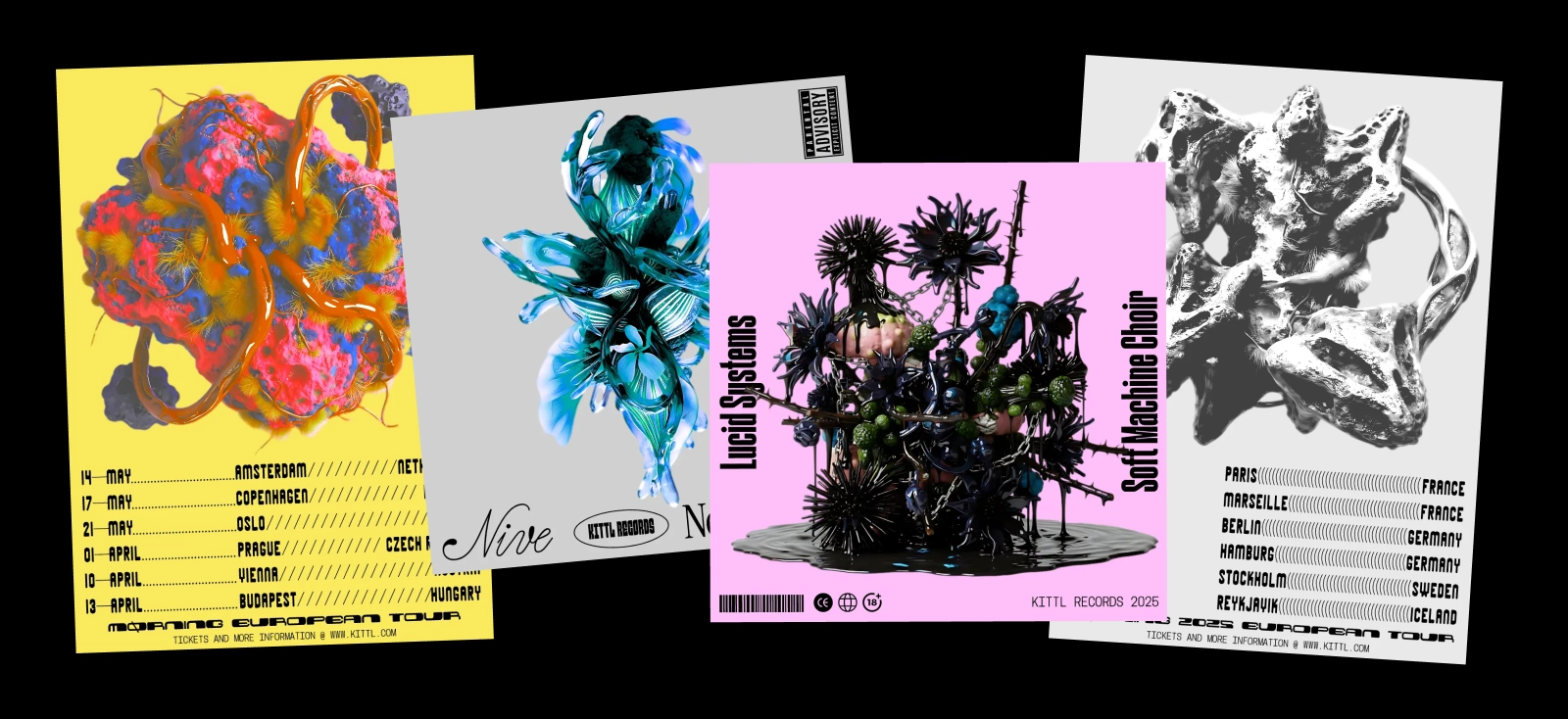
Abstract art has always asked designers to let go — not completely, but enough to move beyond the obvious.
You stop focusing on what something is, and start focusing on how it feels. Color, composition, rhythm, tension. Things that don’t need explanation to work.
Now introduce AI into that process, and something shifts.
You’re no longer the only one making decisions.
That’s where AI abstract art comes in.
In 2026 design trends, it’s not just a technique or a tool — it’s becoming a design direction of its own. One where you’re not starting from nothing, but from generated possibilities. And the work comes from how you respond to them.
What is AI abstract art?

AI abstract art is a form of abstract visual creation where part of the composition is generated or influenced by artificial intelligence.
Instead of manually constructing every element, designers use an AI abstract art generator to produce shapes, textures, and compositions — then refine and curate the results.
At a glance, it still follows the same core principles as traditional abstract art:
- No clear subject or representation
- Focus on color, form, and composition
- Emphasis on mood or interpretation
But the process is different.
Because now, instead of building everything yourself, you’re working with outputs that:
- Don’t always follow human logic
- Introduce unexpected variations
- Shift your original idea in new directions
And that’s what defines AI abstract art.
It’s not just abstraction — it’s interpreted abstraction.
Where AI abstract art comes from
AI abstract art didn’t appear out of nowhere. It sits at the intersection of two things:
- Traditional abstract art
- Generative digital tools
Rooted in traditional abstract art

If you look at artists like Kandinsky or Rothko, abstract art has always been about:
- Removing literal meaning
- Focusing on composition and emotion
- Exploring visual relationships
AI doesn’t change that foundation.
What it changes is how you arrive there.
Influenced by generative design
Long before AI tools became mainstream, designers were already experimenting with:
- generative systems
- algorithm-based visuals
- randomized compositions
What AI does now is make that process accessible.
Instead of writing code or building systems manually, you can use an AI abstract generator to explore similar ideas — faster and more intuitively.
What makes AI abstract art different
At first glance, AI abstract art might look similar to traditional abstract work.
But once you start creating it, the difference becomes clear.
The creative process is collaborative
You’re not designing alone anymore.
With an AI image generator or an AI abstract art generator, the process becomes:
- You prompt
- The system generates
- You select and refine
The final result is shaped by both your direction and the system’s interpretation.
Unexpected results become part of the design
AI introduces outputs that you wouldn’t normally plan:
- Unusual shapes
- Unexpected color relationships
- Compositions that feel slightly off
And instead of fixing them, designers often lean into them.
Because that’s where the work starts to feel interesting.
It shifts the role of the designer
You’re no longer just creating — you’re:
- Curating
- Editing
- Composing from generated material
That shift is subtle, but it’s what makes generative AI abstract work feel different.
Pro Tip
If you’re trying to control every detail, you’re missing the point. The strength of AI abstract art comes from reacting to what you didn’t expect
Why AI abstract art is trending in 2026
AI abstract art isn’t just popular because of AI tools. It fits into a larger shift in design.
Designers want new starting points
Starting from a blank canvas is hard.
AI gives you something to react to — whether it’s:
- a texture
- a composition
- a color system
This lowers the barrier to experimentation.
It blends with other design trends
AI abstract art connects naturally with other 2026 trends:
- Grainy Blur → soft, atmospheric gradients
- Signal Graphics → digital imperfections
- experimental layouts → non-linear compositions
It often acts as a base layer that designers build on top of.
It creates visuals that feel “new”
Because AI doesn’t think like a designer, the outputs don’t always follow expected rules.
That creates visuals that feel:
- Unfamiliar
- Slightly unpredictable
- Harder to categorize
And in a saturated design landscape, that stands out.
Where you’ll see AI abstract art
You’re already seeing AI abstract images across different types of design — even if they’re not labeled that way.
Backgrounds and visual textures
One of the most common uses is AI abstract backgrounds.
They’re used in:
- Websites
- Presentations
- Posters
- Social media
Because they add depth without competing with content.
Poster and editorial design
Designers use AI abstract art as a starting point for:
- Typography-heavy posters
- Campaign visuals
- Experimental layouts
Instead of building everything from scratch, they generate a base and refine it.
Branding and identity systems
More brands are using abstract visuals that don’t represent anything literal.
AI helps create:
- Unique visual systems
- Repeatable textures
- Non-representational identity elements
This makes the brand feel modern without relying on obvious imagery.
How to create AI abstract art in Kittl
AI abstract art isn’t about writing one perfect prompt.
It’s about setting up a system where you can explore, react, and refine quickly — and this is where Kittl actually becomes useful in practice.
You’re not working with one AI. You’re working with a set of different “creative brains,” each interpreting your idea differently.
Step 1 — Open the AI Image Generator and choose how you want to think

Start by opening the Kittl Editor and heading into the AI Image Generator.
Before you even type a prompt, choose a model.
This part matters more than most people think.
Kittl gives you access to 12 different AI models, and they don’t behave the same. Some are structured and precise. Others are fast and chaotic. Some are great for realism, others for experimentation
For AI abstract art, you’ll usually get the most interesting results from:
- Nano Banana → more experimental, less predictable
- FLUX Kontext Pro → more balanced compositions with strong visual structure
- DALL·E 3 → reliable if you want something closer to your prompt
- Flux Schnell / SDXL Flash → fast exploration when you want volume
You’re not picking the “best” one — you’re choosing the type of output you want to react to.
Pro Tip
If your results feel too safe, switch models before changing your prompt. Model choice affects output more than small prompt tweaks.
Step 2 — Write prompts

This is where most people accidentally limit their results.
The goal of prompting for AI abstract art isn’t to describe a finished design — it’s to define a direction.
Think in layers:
- Form → what kind of shapes or structure
- Texture → how it feels visually
- Behavior → how it moves or interacts
Prompts you can actually use
- “layered abstract shapes, uneven balance, subtle tension, soft gradients, no text”
- “fragmented geometric composition, high contrast, grainy texture, generative ai abstract, no text”
- “fluid organic forms, overlapping layers, atmospheric gradient, soft blur, no text”
- “chaotic abstract composition, asymmetrical layout, textured surface, visual tension, no text”
Pro Tip
If your prompt reads like a full design brief, it’s too tight. Loosen it until you’re slightly unsure what you’ll get.
Step 3 — Generate more than you think you need

Now generate — but don’t stop at one result.
Run multiple variations. Then try the same prompt across different models.
What you’ll notice:
- One version might have better composition
- Another might have better texture
- Another might feel slightly “off” in a good way
You’re not looking for a final image yet.
You’re collecting possibilities.
Want to learn more about prompting? Check our articles here:
- AI Design Prompts explained: The simple way to get better results from any model
- 12 Inspiring Kittl AI Art Generator prompts you’ll wish you tried sooner
Pro Tip
Don’t decide immediately. Step away for a minute and come back. The strongest option is often the one you ignored at first.
Step 4 — Use Kittl Flows to push the idea forward

Once something feels close, don’t restart — evolve it.
With Kittl Flows, you can:
- generate variations from your current result
- explore alternate directions
- refine without losing your base idea
This is especially useful when the result is almost right, but not quite there.
Instead of replacing the idea, you’re nudging it forward.
Pro Tip
If something feels 80% there, don’t abandon it. Use flows to explore that direction further — that’s where the best results usually come from.
Step 5 — Choose based on tension, not polish

Now it’s time to select — but not the obvious way.
A lot of outputs will look:
- Clean
- Balanced
- Technically correct
And completely forgettable.
Instead, look for:
- Something slightly unbalanced
- A focal point that grabs your attention
- Contrast that feels a bit uncomfortable
That’s where the design starts.
Pro Tip
If it looks like something you’ve seen before, skip it. The value of AI abstract art is in the unfamiliar..
Step 6 — Break the image before refining it

Most people jump straight into editing.
Try breaking it first.
- crop aggressively
- zoom into one section
- duplicate and layer parts
- isolate one element and remove the rest
Now you’re not working with one image anymore — you’re working with pieces.
This is where tools like background removal and layering become useful — not as features, but as ways to reshape the output.
Pro Tip
If you treat the AI output like a finished image, it will always feel generic. Treat it like raw material instead.
Step 7 — Combine multiple generations (this is where it clicks)

The strongest generative AI abstract work almost never comes from one image.
It comes from combining:
- One for structure
- One for texture
- One for detail
Layer them. Mask them. Blend them.
You can even bring Kittl Flows back in here to generate variations of specific parts.
This is where the design starts to feel intentional.
Pro Tip
If everything comes from one generation, it will always look like AI. Combining multiple sources is what makes it feel designed.
Step 8 — Add structure after the chaos

Only now do you introduce structure:
- Typography
- Alignment
- Hierarchy
- Layout
If you do this too early, you end up designing around the AI instead of with it.
With Kittl, you can find a collection of exclusive fonts you won’t find anywhere else. Check out our font collections here.
Once the composition feels grounded, structure makes it usable:
- Posters
- Branding
- Social graphics
Pro Tip
If your layout is doing all the work, the visual underneath isn’t strong enough yet. Fix the composition first.
Step 7 — Know when to stop

This is the hardest part.
Because you can always:
- Generate more
- Tweak more
- Layer more
But at some point, the piece stops improving and just starts getting heavier.
Step back and ask: does this feel resolved, or just busy?
If it feels clear — even if it’s abstract — you’re done.
Pro Tip
The best AI abstract pieces don’t feel complex. They feel intentional. If it looks complicated but unclear, simplify.
Common mistakes in AI abstract art
Treating generation like the creative part
Generating isn’t the creative part. It’s the starting point.
If your workflow ends there, your work will always feel like a sample — not a design.
The actual work happens in:
- Selecting
- Combining
- Refining
Chasing “better prompts” instead of better decisions
It’s easy to think the problem is your prompt.
Most of the time, it isn’t.
The problem is: you’re expecting the AI to finish the job
Instead of using it to give you something to work with.
Avoiding the weird results
It’s natural to skip the outputs that look strange.
But those are usually the ones worth exploring.
Clean results are easy to replicate.
Unusual ones aren’t.
Over-layering without intention
Yes, layering is powerful. But it can also make everything feel muddy.
If you can’t clearly see:
- What’s foreground
- What’s background
- Where the eye should go
You’ve probably added too much.
Pro Tip
If you remove one layer and the design improves, that layer was never helping.
How designers are actually using AI abstract tools
Most designers aren’t using an AI abstract art generator to get a final image.
They’re using it to:
- Break creative blocks
- Explore variations quickly
- Generate raw material to build from
What makes tools like Kittl useful in this context isn’t just the generation itself, but the ability to:
- Try different AI models without restarting
- Generate multiple variations quickly
- Move directly into editing and combining
Explore more 2026 design trends
Frutiger Aero doesn’t exist in isolation — it’s part of a wider shift happening across design in 2026.
Designers are revisiting older visual languages, not to replicate them exactly, but to reinterpret them using modern tools and new contexts.
In the Kittl 2026 Design Trend Report, you’ll see how different trends explore that idea in completely different ways:
- Signal Graphics leans into early digital chaos — pixelated, low-res, and intentionally imperfect
- Grainy Blur focuses on atmosphere, using gradients and texture to create emotional depth
- Future Medieval blends historical symbolism with digital composition, creating something both ancient and futuristic
- Kid Core brings back playful, expressive visuals rooted in childhood and nostalgia
What ties these together is a shared direction: design is becoming more expressive again.
Less about removing everything, more about choosing what matters and pushing it further.
If you’re curious how these styles connect — and how to actually use them in your work — it’s worth exploring the full report.
Key takeaways: What AI abstract art means for designers
AI abstract art isn’t replacing abstract art. It’s extending it.
It introduces:
- Unpredictability
- Variation
- New ways to explore composition
But the final decisions are still yours.
And that’s what keeps it from being random.
It’s still abstract art. Just with a second voice in the process.
FAQ: AI abstract art
What is AI abstract art?
AI abstract art is abstract visual work created or influenced by AI tools, where designers generate and refine compositions instead of building everything manually.
What is an AI abstract art generator?
An AI abstract art generator is a tool that creates abstract visuals based on prompts, helping designers explore new compositions quickly.
Can I create AI abstract art for free?
Yes, many tools offer free options, including Kittl, where you can generate and refine abstract visuals.
What is AI abstract art used for?
It’s used for backgrounds, posters, branding visuals, and experimental design.

Shafira is a content writer who turns boring business talk into reads people actually enjoy. She grew up hoarding $1 novels in Singapore and writing hilariously bad fiction, but now she tackles content marketing with all that creative chaos since 2019. From blogs and newsletters to UX and SEO, she writes how she thinks: nerdy, honest, and a bit offbeat. She believes the best content is human-designed, not just plain text.