Back when AI image generators were new, most people just threw in every adjective they could think of: “epic”, “cinematic”, “ultra-realistic”, “vivid colours” … hoping something magical would happen.
Often, it didn’t. The output looked generic, or worse: conflicting, overcrowded, or off-balance.
What changed?
For instance, small adjustments — word weights, token ordering, when modifiers are injected, can yield visibly better, more aesthetically pleasing results as opposed to the old style of keyword compounding.
In this guide, you’re going to uncover 12 prompt secrets that have been quietly working behind the scenes, across tools like Kittl AI.
1. Ideogram 3 Quality AI art generator prompt for typography and precise layouts

When it comes to crisp text and layouts that look like they were designed by a professional hand, Ideogram 3 Quality is the model that quietly outshines the rest.
Unlike most AI generators that struggle with words, this one was built to handle typography, making it perfect for posters, branding, and photo-real scenes where placement matters just as much as the image itself.
The trick? Don’t fall back into the old “adjective soup” style of prompting. A study showed that well-designed prompts (even ones adapted from user inputs) outperform generic “keyword dumps” both in automatic metrics and human preference.
Studies and user testing show that Ideogram responds best to full sentences and clear structure.
Describe what goes where: “headline at the top,” “photo in the center,” “small text bottom left.” And if you need pixel-perfect typography, always quote the exact string you want and pair it with a font vibe, like “grotesk, bold, tight tracking.”
Here’s a prompt example that gets consistent, print-ready results:

Prompt:
“Design a minimalist tour poster for ‘Glass River’. Big headline at the top reading ‘GLASS RIVER’ in bold grotesk, tight tracking. Center: a moody long-exposure photo of a river at dusk, light trails. Lower left: small white text ‘Jakarta — 12 Oct 2025’. Black background, high contrast, generous margins, print-ready composition.”
The difference is striking. Instead of hoping the AI guesses your intent, you’re giving it a blueprint. That’s why Ideogram 3 Quality has become a hidden favorite for designers who need their text to land cleanly every single time.
2. Ideogram 2.0a AI art generator prompt for quick graphics and text

If speed is your priority, Ideogram 2.0a (often called 2a) is your go-to. It’s lighter, faster, and more affordable than other versions, yet still strong enough to handle text reliably, something most AI models continue to struggle with.
That makes it perfect for quick iterations, event flyers, or social graphics where turnaround time matters more than absolute photorealism.
When prompting, stick with the natural sentence style used in newer versions (2+ and 3). You don’t need the old “keyword stuffing” approach.
Instead, describe the design in plain language, and if your interface lets you, specify whether you want to prioritize speed or quality.
Here’s an example that consistently delivers a clean, modern flyer:

Prompt:
“Make a clean event flyer with the title ‘Kittl Creators Meetup’ centered. Subhead: ‘Thu, Oct 30 — 7 PM’. Background: soft gradient teal→indigo. Include a thin white border, modern sans-serif, airy layout.”
The output you’ll get is sharp, minimal, and ready to tweak. Because 2.0a is so responsive, it’s ideal when you want to test multiple variations fast before refining with a heavier model like Ideogram 3 Quality.
3. ChatGPT Image 1 AI art generator prompt for complex scenes and edits

If you’re working with multi-layered concepts – think realistic environments, narrative scenes, or images that need both objects and text to make sense together: ChatGPT Image 1 (also known as gpt-image-1) is your best bet.
It stands out for its strong compositional logic, making sure every element in the scene has a believable relationship to the others. It also accepts image inputs for edits, which opens the door to refining results rather than starting over from scratch.
When you see an “HD” option in a third-party interface, it isn’t a different model. It simply runs the same model with higher resolution and more compute. That means longer runtimes but bigger, sharper images.
The key to prompting here is photographer-style detail. Be explicit about the camera, lens, lighting, and spatial arrangement. Give the exact text strings you want to appear, and avoid stacking contradictory adjectives. Treat it like briefing a real photoshoot.
Here’s an example that captures both realism and typography:
Prompt:
“Ultra-detailed editorial photo: a pastry chef in a sunlit kitchen placing ‘Kittl’ stenciled powdered sugar atop a doughnut pyramid. 35 mm lens, shallow depth of field, natural window light, crumbs on the marble. In the background, a chalkboard reads ‘OPEN AT 7’ in neat handwriting.”
Because this model interprets scenes with such precision, the results often feel like a professional photo shoot brought to life.
It’s especially powerful when you need both realism and readable text in one frame — something most other models struggle to balance.
4. FLUX Kontext Pro AI art generator prompt for artistic styles and creative renders

In Kittl, FLUX Kontext Pro is especially good at producing stylized, textured, and artistic lettering.
While it isn’t a tool for precise photo editing, it shines when you want to combine playful textures, materials, and bold creative effects inside your designs.
The best approach is to keep your prompts short and focused on materials or style direction, describing how each element should look.
Kontext Pro responds well when you clearly define textures, shapes, and finishes — making it ideal for lettering challenges, mascots, or decorative visuals.
Here’s an example prompt that delivers strong results (as shown in the FLIP demo above):
Prompt:
“The word ‘FLIP’ rendered in 3D, on a transparent background. The ‘F’ is covered in realistic green grass texture. The ‘L’ is a shiny blue inflatable balloon with a knot at the top. The ‘I’ is a metallic silver, rounded rectangular shape with subtle highlights. The ‘P’ is covered in fluffy yellow faux fur texture. Each letter has a slight shadow beneath it, giving it depth. Solid fills only, no gradients, textures, or extra effects.”
The result: bold, imaginative letterforms that feel tactile and unique. This makes FLUX Kontext Pro a great option for brand experiments, challenges, and eye-catching design concepts where style matters most.
5. Google Imagen 4 AI art generator prompt for photorealism and polished text

Google Imagen 4 shines when you want high aesthetics, accurate text rendering, and strong prompt adherence. It improves typography compared to earlier versions and is accessible through Vertex AI or Gemini tooling.
The best way to prompt Imagen 4 is with structured sentences. Be specific about the layout, font style, and kerning, and give the AI a clear blueprint for where elements should appear.
Here’s an example that balances realism with clean typography:
Prompt:
“Photoreal coffee truck scene on a Parisian street at golden hour. Truck side reads ‘Café Matin’ in cream serif letters, evenly kerned. Two people in mid-conversation, steam drifting, cobblestone reflections, 50 mm, f/2, natural flare.”
When you guide it with exact placement and font cues, Imagen 4 produces results that feel as carefully art-directed as a professional shoot.
6. FLUX 1.1 Pro AI art generator prompt for speed and cinematic realism

FLUX 1.1 Pro is a solid choice when you need fast, reliable text-to-image generations with strong prompt adherence. It handles wide aspect ratios well, making it great for cinematic looks or product shots.
Prompting works best with natural language. Write as if you’re describing a scene to a photographer: mention camera setup, lighting, and mood. If your UI includes a “raw mode” toggle, use it for more photographic realism.
Here’s a prompt example that produces consistent, polished results:
Prompt:
“Cinematic product photo: matte-black wireless headphones on a reflective black acrylic surface, rim-lit, soft top light, faint smoke, 3:2 aspect, studio realism.”
When guided with plain, descriptive language, FLUX 1.1 Pro delivers sharp, cinematic outputs quickly — making it a reliable workhorse for everyday design needs.
7. FLUX 1.1 Pro Ultra AI art generator prompt for high-resolution realism

If you need production-ready renders with more detail, FLUX 1.1 Pro Ultra takes the Pro model up a notch.
It supports 4-megapixel outputs and includes a “raw” realism, making it ideal for large-format visuals or client-facing work where sharpness matters.
Prompting works the same way as with Pro: use natural language with clear references to camera, lighting, and mood.
To maximize results, add phrases like “raw photo look” and, if supported, specify aspect ratio and megapixel output.
Here’s an example prompt that highlights its strengths:
Prompt:
“4MP architectural photograph of a minimal concrete house at twilight, large glass facade, interior warm lighting, long exposure reflections in a swimming pool, raw photo look, 16:9.”
FLUX 1.1 Pro Ultra excels when you need both speed and fine detail, giving you polished images that can stand up to closer inspection or high-resolution use cases.
8. FLUX Schnell AI art generator prompt for rapid ideation and thumbnails

When speed matters more than detail, FLUX Schnell is the model to reach for. It generates results in just 1–4 steps, making it ideal for quick concepting, ideation, or thumbnail creation before committing to a heavier model.
Because it runs in fewer steps, the key is to keep your prompts concise and conflict-free. Avoid long strings of adjectives or contradictory directions — Schnell responds best to clear, direct inputs.
Here’s an example prompt that works well for fast iteration:
Prompt:
“Graphic neon cyberpunk alley at night, rain on pavement, glowing kanji signs, shallow depth of field, dramatic contrast.”
FLUX Schnell won’t give you polished, production-ready detail, but it excels at helping you explore ideas quickly and decide which direction to refine with a slower, higher-quality model.
9. Nano Banana AI art generator prompt for consistent edits and figurine effects

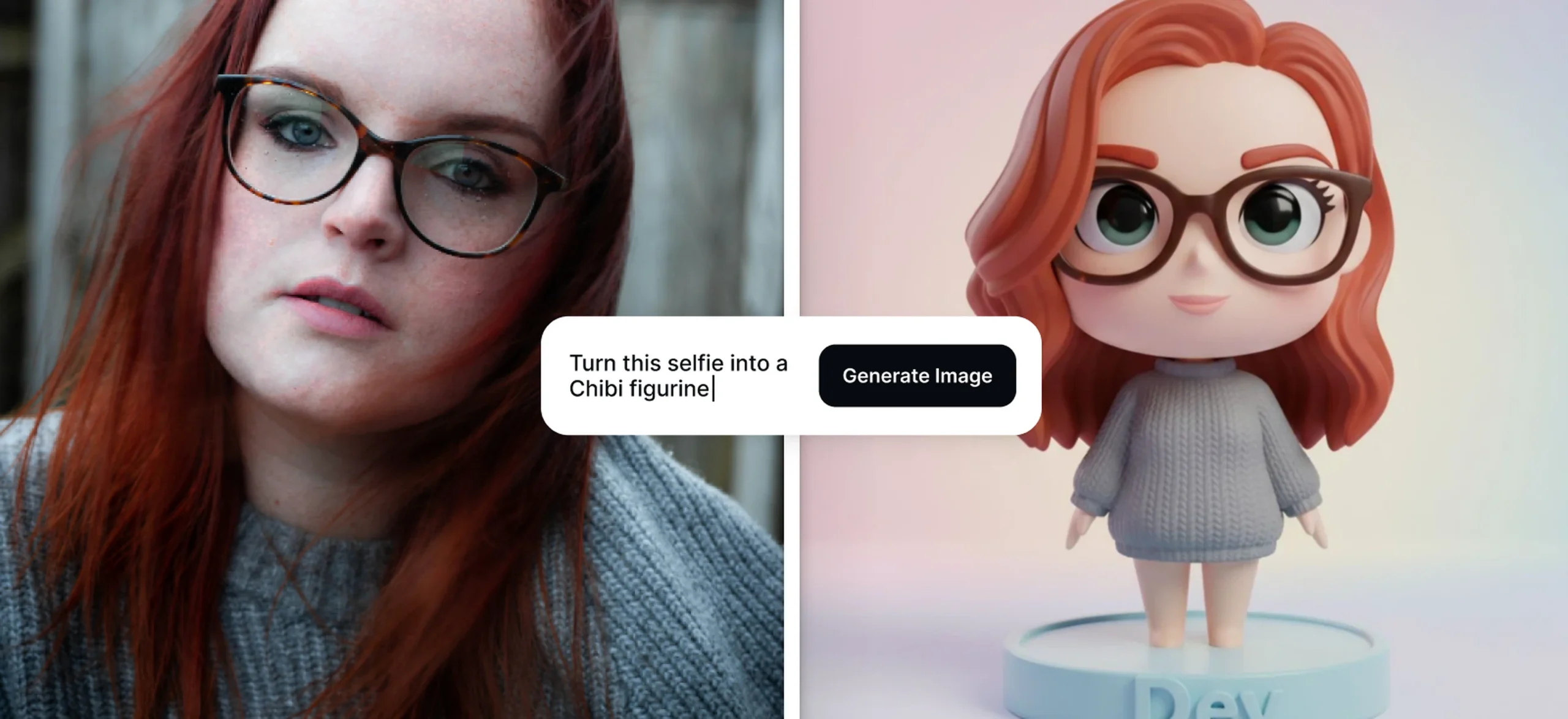
Also known as Gemini 2.5 Flash Image, Nano Banana is best when you need multi-turn edits, character consistency across scenes, or playful figurine-style outputs. It handles both text and image prompts, making it flexible for refining identities or props over multiple generations.
Prompting works especially well when you combine a photo input with a conversational instruction. Be clear about the identity or objects you want to keep consistent — like specific hair, glasses, or props — so the AI carries them through each edit.
Here’s an example that taps into the popular figurine effect:
Prompt:
“Turn this selfie into a 3D vinyl figurine: same hair and glasses, matte plastic finish, big chibi eyes, standing on a round base that says ‘Dev’, studio lighting, pastel background.”
Nano Banana shines when you want to preserve recognizability while shifting style, making it a go-to for playful edits, avatars, and creative product mockups.
10. Seedream 3 AI art generator prompt for high-resolution covers and sharp text

Seedream 3 by ByteDance is built for native 2K outputs, making it a strong choice when you need high-resolution results, sharp small text, or bilingual (ZH/EN) support.
It’s also fast, which makes it practical for design work where detail and clarity are equally important.
When prompting, write in descriptive sentences and be exact about any text you want to appear. Add “2K output” to lock in maximum resolution. This makes Seedream 3 especially good for editorial-style layouts, posters, and covers.
Here’s an example prompt that takes advantage of its strengths:

Prompt:
“High-end magazine cover with the masthead ‘VECTOR’ in condensed serif at the top, coverline ‘Type Trends 2026’ bottom left, portrait of a designer in a sunlit studio, shallow DOF, neutral color grading, 2K output.”
Seedream 3 delivers clean typography and crisp detail, which makes it a hidden gem for professional-looking covers or branded graphics straight out of the generator.
11. SDXL Flash AI art generator prompt for quick concepts and painterly ideas

SDXL Flash is a community-driven, fast variant of SDXL. It’s best for rapid concepting and quick idea generation, running in fewer steps than standard SDXL.
While the output isn’t as polished as SDXL paired with Refiner or Lightning, it’s great when you need speed over perfection.
Prompting works best when you keep it short and direct. Avoid long, overloaded descriptions. This model responds better to simple, focused instructions. If your workflow allows, follow up with an upscale or refine pass to boost quality.
Here’s an example prompt that plays to its strengths:
Prompt:
“Whimsical storybook cottage under giant mushrooms, soft morning fog, painterly brushwork, warm palette.”
SDXL Flash is perfect for brainstorming visuals on the fly, letting you sketch out ideas quickly before moving to a slower, higher-quality model for refinement.
12. DALL·E 3 AI art generator prompt for versatile scenes and clean icons

DALL·E 3 is best for creating everything from simple icons to complex illustrated scenes, with the added benefit of conversational refinement inside ChatGPT.
It handles embedded text reasonably well and has strong safety features, making it a reliable choice for practical design tasks.
Prompting works best when you’re specific without being contradictory. Quote exact text strings when you need signage or labels, and don’t hesitate to refine the prompt in step. ChatGPT can expand or adjust your wording to get closer to the result you want.
Here’s an example prompt tailored for clean, consistent output:
Prompt:
“Flat icon set for a finance app: 12 icons, rounded-corner style, 2-color palette (indigo & mint), consistent stroke weight 2 px, white background, include: wallet, card, graph, piggy bank, shield, receipt, lightning, bell, gift, settings, user, support.”
DALL·E 3 shines when you need versatility and clarity in your results, especially for UI assets, branded illustrations, or multi-element compositions that need to look cohesive.
Key takeaways: AI art generator prompt cheat sheet
| No | AI generator | Category / best for | Prompt style tip |
| 1 | Ideogram 3 Quality | Typography, posters, branding, precise layouts | Full sentences, describe placement, quote exact text with font vibe |
| 2 | Ideogram 2.0a | Fast, affordable graphics, flyers, and quick text work | Natural sentences, specify speed/quality if available |
| 3 | ChatGPT Image 1 | Complex conceptual scenes, edits, compositional logic | Be explicit about camera, lens, and lighting; quote exact text |
| 4 | FLUX Kontext Pro | Stylized lettering, textures, artistic renders | Keep prompts short and focus on textures, materials, and finishes |
| 5 | Google Imagen 4 | Photorealism, polished text, high aesthetics | Structured sentences, specify layout, font style, and kerning |
| 6 | FLUX 1.1 Pro | Fast, reliable realism, cinematic looks, wide ratios | Natural language; include camera/lighting; use raw mode if offered |
| 7 | FLUX 1.1 Pro Ultra | High-res (4MP) production renders, raw photo realism | Same as Pro; add raw photo look and resolution details |
| 8 | FLUX Schnell | Rapid ideation, thumbnails, concept sketches | Keep it concise; avoid long or conflicting prompts |
| 9 | Nano Banana (Gemini 2.5 Flash Image) | Multi-turn edits, identity consistency, figurine trend | Photo + prompt; conversational tone; call out props/identity |
| 10 | Seedream 3 | High-resolution (2K) outputs, bilingual text, covers | Descriptive sentences; specify exact text and “2K output” |
| 11 | SDXL Flash | Quick painterly concepts, speed-focused drafts | Short and direct; refine or upscale after if needed |
| 12 | DALL·E 3 | Versatile icons to scenes, conversational refinement | Be specific but not contradictory; quote signage text |
AI art generator prompts that actually work
Every model has its own sweet spot. Depending on what you need for your design, some AI might work better for your project than others.
Regardless of what AI you choose, the way you write your prompts makes all the difference.
Some reward detailed direction, others thrive on brevity. Yet the same set of universal tricks consistently improve results.
- Quote exact text (e.g., “Kittl”) to avoid misspellings.
- Specify relationships like “top-left corner” or “on the truck door” when layout matters.
- Name the photo style. Lens, lighting, or mood, to guide realism.
- Use image references for edits or style consistency.
- Don’t overstuff adjectives on fast models like Schnell or SDXL Flash.
Mastering these small details turns AI from a guessing game into a reliable design partner. The more intentional your prompts, the closer you’ll get to results that feel polished, professional, and ready to use.