If you’ve ever tried making AI Christmas ads during the holiday rush, you already know the struggle: too many ideas, too little time, and somehow everything starts looking like the same three stock images in different sweaters.
Small-business owners feel it. Content creators feel it. Even designers who love experimenting hit that December burnout pretty fast.
So this year, we tried something different.
We used Kittl Flows. and ended up creating 20 fully polished AI Christmas ads in under an hour.
Not rough drafts. Not “maybe I can fix this later” ideas.
Actual, ready-to-post ads with consistent visuals, clean lighting, matching angles, and the kind of polished storytelling you’d normally spend days building.
The best part? You don’t need to be a designer, a prompt expert, or even someone who knows ads really well. You just need a workflow that removes the heavy lifting.
And that’s exactly what we’re going to walk through.
What makes Kittl Flows different from other AI tools
Most AI platforms can give you a nice Christmas image. Canva has templates. Adobe Express has templates. Midjourney gives you one strong generation at a time.
They’re great for quick ideas, but they fall short when you need a full set of ads that look like they belong together.
Kittl Flows works in a completely different way.
Instead of producing isolated outputs, Flows helps you build a repeatable visual system. Each Christmas bundle comes with its own creative framework, including:
- Structured prompt templates to shape the story and style
- Camera angle presets so every image lines up visually
- Lighting setups that lock the mood across your whole campaign
- Finishing steps that keep the final polish consistent
Consistency’s the part most AI tools struggle with. But Flows makes it the starting point.
It also lets you choose the best AI engine per style while staying within the same workflow:
- Kittl Flows x Nano Banana: Crisp commercial lighting. Clean, product-focused ads. Great for gift promos, lifestyle objects, and anything that needs sharp detail.
- Kittl Flows x Seedream 4: Soft, cozy holiday atmosphere. Dreamy, nostalgic scenes. Perfect for 60s-inspired art, warm Christmas storytelling, and anything with retro charm.
This combination means you’re not tied to a single look or a single output. Flows acts like the creative glue that keeps everything aligned, even as you explore different aesthetics or engine strengths.
Because every step branches into a new variation, you can generate multiple directions from a single idea and compare which version feels right before adding text, icons, or final touches for your ads.
The exact workflow we used to generate 20 AI Christmas ads in under an hour
If you’ve never used Kittl Flows before, the process can look almost magical from the outside. But once you understand how it works, it becomes a ridiculously fast way to turn a rough idea into a full set of holiday ads.
Here’s exactly how we built ours.
Step 1: Start with “idea ingredients”

Instead of typing a long prompt and hoping AI guesses what you mean, Flows lets you show your idea visually first.
So let’s start working with this template. We dragged in a few simple images into the:
- A Christmas tree
- A cookie
- A photo of a woman with an approximate pose that looked like she was holding something
These images act as visual cues. Nothing needs to match the final style. They’re just placeholders to help the AI understand composition and intention before you start refining.
This step alone saves you from a lot of guesswork you normally face with single-prompt AI tools.
Step 2: Add a Smartboard and transform the scene

Next, we created a Smartboard powered by Seedream 4 and gave it a broad direction:
“Make a vintage illustration.”
Flows instantly generated a new visual in that style. From here, every Smartboard becomes a new fork in the creative path.
Step 3: Add a second Smartboard to refine the look

Now that we had the general vibe, we added a new Smartboard to produce more specific directions.
We used 2 different prompts to see which one we like more:
- “Create a vintage-style photograph of a woman holding a beautifully decorated cake, reminiscent of mid-20th-century aesthetics. The image should feature soft, diffused lighting, slightly muted colors, and a shallow depth of field to enhance the nostalgic feel. The woman’s attire and the cake’s design should reflect classic vintage styles, adding to the overall charm and authenticity of the scene, fix the hair.”
- “Make an illustration of a woman focusing on holding a cake with a happy face, 60s style, the woman is in the middle, and the Christmas tree is on the left, medium closeup.”
If you’re not used to writing prompts or if you feel unsure about how to describe style, lighting, or camera details, we have a full guide that breaks this down in the simplest way possible.
Now, the Flows produced two entirely different branches. Both illustrated, but with noticeably different interpretations.
The top version leaned into an older, more traditional look with vintage attire and a classic holiday mood, while the bottom version had a more modern illustrated feel, with updated styling and a cleaner, contemporary vibe.
Step 4: Pick a direction and refine it again

Once we saw which branch had the strongest potential (we are seriously in love with the vintage look of the top image), we guided it again with a more detailed aesthetic prompt:
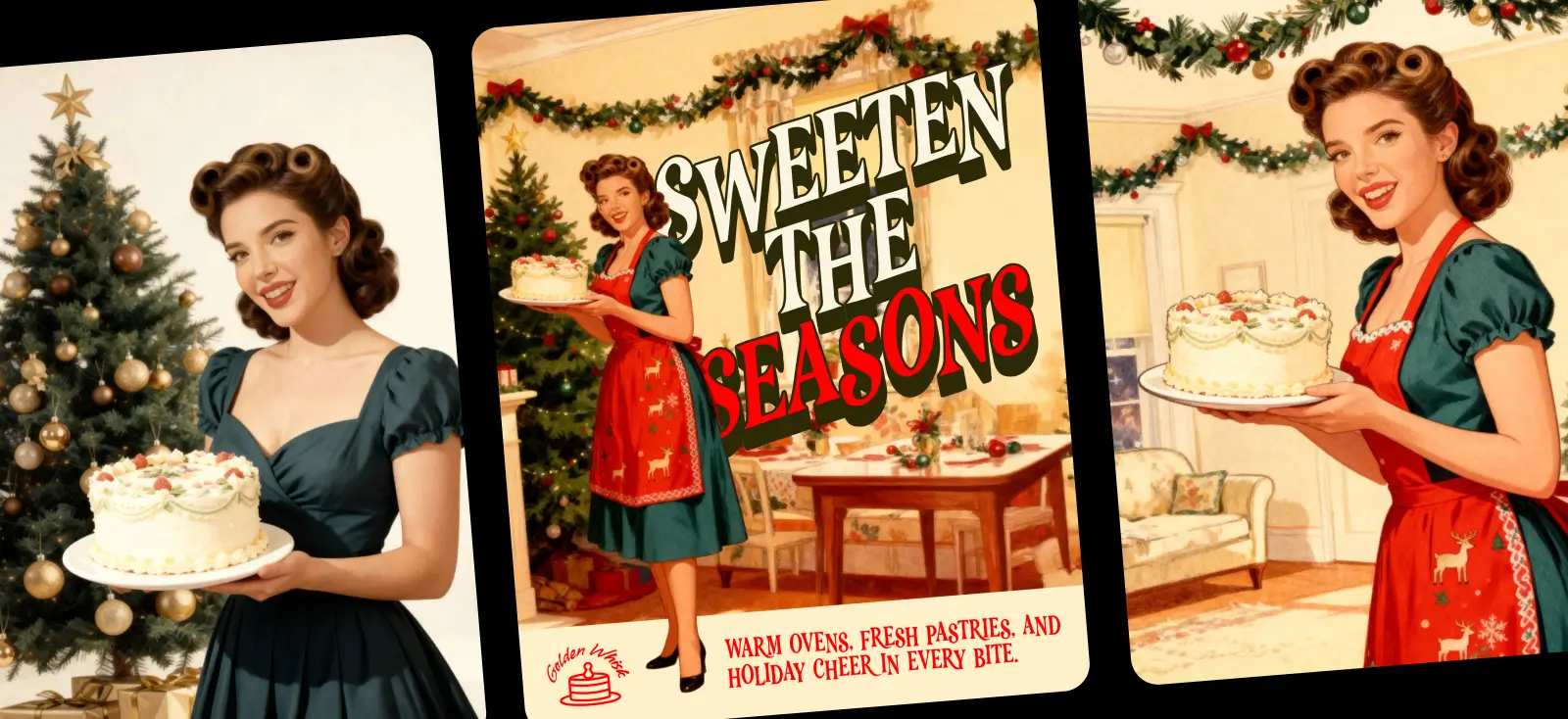
“1960s retro illustration of a cheerful woman seen from a three-quarter angle, holding a decorated Christmas cake on a plate, wearing a festive red apron, cozy home background with Christmas garlands, vintage holiday card style.”
This refinement tightened the style, clarified the character, and made the composition feel purposeful.
You can repeat this refinement step as many times as you want, or branch off into new directions if inspiration hits.
Step 5: Edit the prompt Smartboard

Sometimes you get an image that’s so close to what you want, but not quite there. Say, we love the vintage woman holding a cake from the previous Smartboard.
The styling is perfect, the vibe is right, but the pose feels too close-up for your ad layout, and the scene is missing some holiday decoration.
Instead of rewriting a whole new prompt or starting from scratch, we simply create another Smartboard. From there, we adjusted the prompt to zoom out the angle, add Christmas elements in the background, or tweak the overall scene until it fits our vision.
And beyond that, you can refine anything you need:
- Color palettes
- Facial expressions
- Poses
- Atmosphere
- Lighting styles
- Camera angles
- Other small styling details.
It’s an easy way to create multiple polished versions of the same concept without ever having to retype your full prompt.
Optional tip: Swap engines when needed
Kittl Flows doesn’t lock you into a single AI engine. Instead, you can switch models depending on the look, speed, or precision you need. Each one brings a different strength to your Christmas ads:
- Nano Banana Pro: Google SOTA image generation. The most advanced Nano model. Great for high-quality scenes when you want rich detail and sharp refinement.
~40 seconds · 40 tokens - Nano Banana (Fast + Versatile): Perfect for quick iterations, solid accuracy, and balanced results. Ideal when you’re generating a lot of ads quickly.
~15 seconds · 10 tokens - Seedream 4: Known for refined artistic realism and 4K-quality detail. Excellent for nostalgic, dreamy Christmas scenes.
~40 seconds · 10 tokens - ChatGPT Image 1 HD: Extremely strong prompt adherence with crisp, expressive detail. Great when you need the AI to follow your instructions closely.
~60 seconds · 42 tokens - ChatGPT Image 1: Fast, reliable, and flexible. A solid choice for experimentation or when you want a versatile illustrated look.
~30 seconds · 14 tokens
Each engine lets you take your idea into a different direction: more realistic, more artistic, more modern, more nostalgic.
And because you can branch inside Flows, you can compare them side by side and pick the version that best fits the ad you’re building.
Step 7: Convert your final choice into an image

Once we had the version we loved, we just converted it to an image. This “locks in” the artwork and turns it into a ready-to-edit element.
Now it’s time for final polishing.
Step 8: Add text, icons, layers, and polish

This is where our ad turns from “AI-generated image” into a complete, usable design.
We added:
- Vintage-inspired typography
- A simple brand icon
- A warm bottom panel for the tagline
- Background Remover to cut out the character so she looks like she’s stepping out of the scene
- Layering adjustments to place the headline behind her
- Additional layering so her feet sit naturally in front of the bottom banner
You can also:
- Reframe for platform-specific crops
- Upscale
- Adjust colors with palettes once you vectorize the raster image
- Add mockups for product presentation
- Remix your raster image
After repeating this workflow across multiple branches, I ended up with 20 fully polished Christmas ads. All aligned in theme, but with unique compositions and styles.
And the whole thing took under an hour!
Smartboard starter prompts for AI Christmas ads
See, when you’re starting a new Smartboard, you don’t need a perfect prompt.
What you need is a clear scene structure that gives the AI enough direction to build from. A simple format like this already puts you miles ahead.
[Technical details] + [Lighting] + [Subject/Main concept] + [Perspective/Composition] + [Action/Pose] + [Setting/Environment] + [Style/Aesthetic]
The prompts below follow that structure and are designed to give your first Smartboard a strong foundation. Use them as your initial spark, branch off, refine, and let Flows evolve the idea into multiple polished holiday ad variations.
1. Product ads
Prompt 1
Ultra-sharp commercial detail. Soft diffused holiday lighting. A wrapped Christmas gift box with ribbon. Centered 45° product angle. Resting slightly forward on a clean surface. Cozy blurred lights in the background. Modern minimal holiday aesthetic.
Prompt 2
Crisp product realism. Bright studio glow with golden reflections. A festive scented candle. Close-up macro perspective. Placed upright without motion. Simple winter greenery around it. Scandinavian-inspired holiday styling.
2. Food & bakery ads
Prompt 1
Detailed food photography. Warm kitchen lighting. A decorated Christmas cookie on a ceramic plate. Top-down flat lay. Cookie rotated slightly for styling. Wooden table with scattered sprinkles. Cozy homemade holiday baking style.
Prompt 2
Realistic texture rendering. Gentle side lighting. A freshly baked Christmas cake with icing. Three-quarter angle view. Cake lifted slightly on a stand. Blurred garlands behind it. Vintage holiday cookbook illustration aesthetic.
3. Apparel & gift shop ads
Prompt 1
Clean textile detail. Soft studio lighting with mild vignette. A folded Christmas sweater. Overhead centered layout. Static garment arrangement. Simple backdrop with gift-wrap accents. Minimal catalog-style holiday fashion.
Prompt 2
High-resolution portrait clarity. Warm festive lighting. A model wearing a Christmas scarf. Medium close-up frame. Relaxed expression with slight head tilt. Snowy bokeh background. Classic department-store holiday style.
4. Lifestyle & holiday atmosphere ads
Prompt 1
Cinematic realism. Golden-hour glow. A family gathered around a Christmas tree. Wide-angle composition. Placing ornaments together. Cozy living room with fireplace. Soft nostalgic holiday storytelling.
Prompt 2
Sharp foreground with soft depth. Fairy-light illumination. A woman holding hot cocoa. Medium portrait framing. Gentle upward gaze. Living room with garlands. Retro 1960s Christmas card styling.
5. Minimalist aesthetic ads
Prompt 1
Clean vector precision. Neutral even lighting. A single red Christmas ornament. Centered composition with negative space. Suspended gently from ribbon. Plain beige background. Modern minimalist holiday aesthetic.
Prompt 2
Flat graphic rendering. Soft drop shadow. A simple wrapped gift box. Straight-on centered view. Static composition. Monochrome backdrop. Japanese-inspired minimal Christmas design.
6. Creator / social media ads
Prompt 1
Crisp portrait clarity for social media. Bright even lighting with rim glow. A creator holding a holiday product. YouTube-style close-up framing. Energetic expressive pose. Blurred studio background with lights. Bold festive influencer aesthetic.
Prompt 2
High-contrast lifestyle rendering. Studio ring-light illumination. A holiday haul arranged neatly. Top-down flat lay. Hands adjusting items. Neutral backdrop with evergreen sprigs. Clean TikTok-inspired holiday look.
If you’re trying to get better at prompting or need extra vocabulary, you can explore it through our collection of AI tools and guides. And if you want a clearer breakdown of structured prompting, we also have a simple step-by-step prompt guide.
See more Christmas ads made with Kittl Flows
If you want to get a feel for how Smartboards actually work, you can explore more Christmas ads we’ve already built using Flows.
Each project shows the full chain of Smartboards behind the final image, so you can click through the branches, study the prompts, and see how small adjustments shape the final look.

Skater Santa Ad with Flows. Edit this template

Skater Flow x Nano Banana. Edit this template

Christmas cake sale ad with Flows.
Edit this template

Flyer promo ad with Flows x Nano Banana.
Edit this template
It’s a simple way to learn by observing real examples (and a great starting point before creating your own holiday ads!)
Key takeaways for making AI Christmas ads fast
If there’s one thing this workflow proves, it’s that creating polished AI Christmas ads doesn’t have to be complicated or time-consuming. Here are the essentials to remember when building your own holiday visuals:
- Clear, well-structured prompts save you hours of trial and error
- Camera angles matter more than people think. They create visual consistency
- Switching between engines such as Nano Banana Pro, Nano Banana, Seedream 4, ChatGPT Image 1 HD, or ChatGPT Image 1 helps you control the look more precisely and produce cleaner, more intentional results.
- Editing everything inside the Kittl Editor ties your final ad set together
- And yes, with Flows, generating 20 ads in under an hour is absolutely realistic!
Ready to make your own Christmas ads?
Start with Kittl Flows, try the holiday bundles, experiment with different AI engines, and finalize everything with text, layout, and color tools in the Editor. It’s a simple workflow that grows with your ideas, not against them.