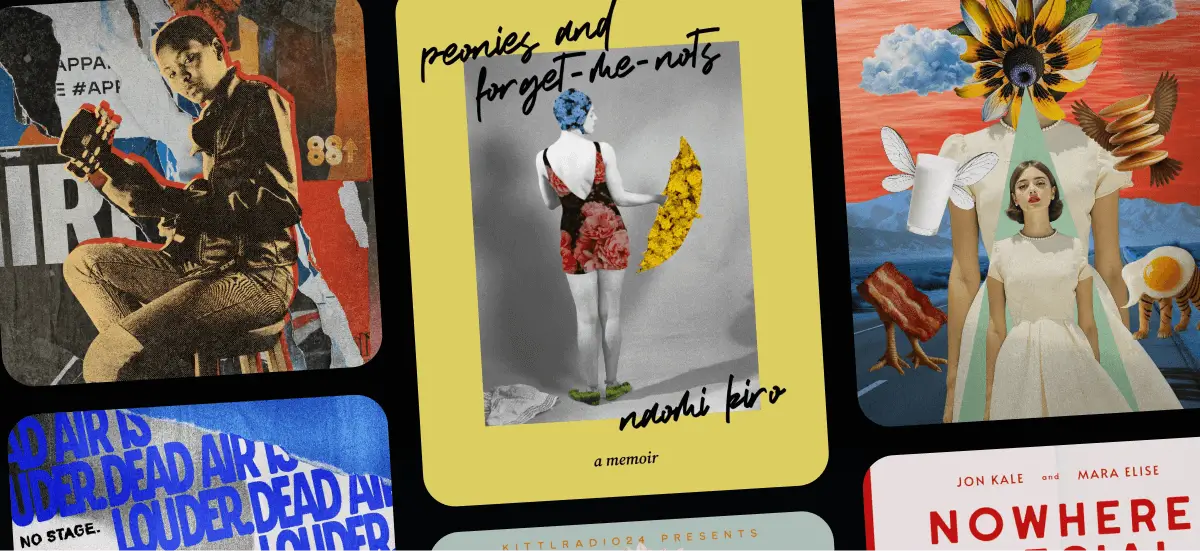
Collage art is having a massive renaissance. From high-fashion editorial spreads to gritty streetwear merch, the clash of vintage aesthetics with modern, digital chaos is everywhere. But let’s be honest: traditional digital collage is a grind!
If you’re doing this the “old school” way, you are likely spending 80% of your time painstakingly masking out backgrounds point by point and only 20% actually designing. That kills the creative flow.
The modern designer doesn’t have time to fight with the Pen Tool for three hours just to cut out a single cat. You need speed, precision, and an infinite library of assets at your fingertips.
Are you a freelancer riding the latest design waves or a seasoned graphic designer looking to speed up your workflow? Worry not because we’ve compiled the ultimate list of collage art tips to help you create professional-grade visuals in a fraction of the time using Kittl.
Here is how to master the mixed-media look without the headache.
What is collage art? A modern definition

Collage art is the practice of assembling disparate visual elements — photographs, typography, textures, illustrations, and shapes — into a single composition that tells a new story. At its core, collage thrives on contrast. Old meets new. Clean meets rough. Order meets chaos.
Traditionally, collage was a physical process. Designers and artists literally cut images from magazines, newspapers, and photographs, then glued them together by hand. That tactile, imperfect quality is what gave collage its raw emotional power.
Today, collage art has evolved into a digital-first medium. The tools have changed, but the intent hasn’t. Modern collage still relies on layering, disruption, and visual tension — just executed with far more speed, flexibility, and experimentation than ever before.
And while the aesthetic of collage embraces chaos, the process doesn’t have to.
Why collage art is everywhere right now
Simply put, there’s a growing nostalgia for analog textures and imperfect design. Torn paper, grainy photos, warped typography, and handmade details feel more human in a sea of polished, overly clean visuals. Collage allows designers to blend that raw, tactile energy with modern layouts and digital precision.
Add faster tools, AI-powered workflows, and instant access to curated assets, and collage becomes one of the most expressive — and efficient — ways to create bold visuals today.
Types of collage art you’ll see today
Collage isn’t a single style. It’s a flexible approach that shows up in many forms, depending on the goal and medium:
- Editorial collage
Often seen in magazines and digital publications, this style mixes photography, typography, and illustration to support storytelling and commentary. - Type collage
Typography becomes the main visual material. Letters are stacked, warped, layered, and treated as shapes rather than just words. - Merch collage
High-contrast, print-ready compositions designed for T-shirts, posters, stickers, and streetwear graphics. - Moodboard collage
Used in branding and concept development to explore visual directions, textures, and themes before final execution. - Surreal collage
Dreamlike scenes built from realistic elements, often bending scale, logic, and perspective to create impossible imagery.
No matter the style, the foundation is the same: intentional composition, clean cut-outs, cohesive textures, and a workflow that keeps you creating — not stuck doing busywork.
Essential collage art tips to work faster
Collage art rewards bold ideas, sharp instincts, and a willingness to experiment. But without the right workflow, it can also become slow, technical, and frustrating — especially when you’re stuck cutting, masking, and organizing instead of actually designing.
The key isn’t simplifying your visuals. It’s simplifying your process. Here’s how:
1. Structure your chaos (Don’t just “throw” things!)

The biggest misconception about collage art is that it’s just a random assortment of images thrown onto a canvas. That’s basically clutter. The most successful collages rely on a hidden structure that guides the viewer’s eye through the chaos.
Before you start dragging assets, establish a grid or a focal point. If you are struggling with layout, you don’t need to start from zero. Use Kittl’s collage templates to set a foundation.
Think about Bauhaus design principles: balance, hierarchy, and scale are just as important in a punk-rock collage as they are in minimalist design. A strong composition anchors your “wild” elements, making the final piece feel deliberate and professional.
2. Master the “cut-out” in seconds

Nothing screams “amateur collage” louder than messy, jagged edges on your cut-outs. In the past, achieving a clean isolation — especially on complex objects like hair, fur, or vintage illustrations — meant zooming in at 400% and manually clicking anchor points for an hour.
One of our top collage art tips for 2025? Stop doing manual labor.
Kittl’s AI Background Remover is designed to recognize the subject instantly and isolate it with clean, commercial-ready edges.This is crucial for Print-on-Demand (POD) creators. If your edges are messy, your T-shirt print will look cheap. By automating the extraction process, you free up your brain to focus on how the element fits into your story, rather than stressing over pixels.
3. Curate, don’t collect

One of the most frequent mistakes in digital collage is mixing assets with vastly different resolutions or illustration styles. A flat vector icon next to a hyper-realistic Victorian etching usually creates visual friction — and not the good kind. It breaks the immersion.
To maintain a professional look, you need assets that share a visual language. Instead of scouring five different stock sites, leverage the specific stylistic tags in Kittl’s Content Library.
Search for terms like “halftone,” “etching,” or “vintage botany“. Kittl’s library is heavily curated for this specific aesthetic. By sourcing your elements from a unified library, you ensure that the grain, line weight, and “era” of your elements feel cohesive!
Pro Tip
If you are blending eras, check out our guide on classic art in modern trends or Japanese art design. These resources can help you understand which historical styles complement modern layouts.
4. Solve the “missing asset” problem with AI

Every designer knows the struggle: you have the perfect composition in your head, but the specific image you need — say, a “retro astronaut holding a bouquet of sunflowers” — doesn’t exist on any stock site. You waste hours doom-scrolling, or you settle for something “close enough.”
This is where generative AI becomes one of the most powerful collage art tips in your arsenal!
Don’t settle. Use Kittl’s AI Image Generator to create the exact asset your composition demands. This isn’t about replacing your creativity. Think about it as a way to remove the limitation of available stock. You can generate specific objects with transparent backgrounds or consistent styles (like “oil painting” or “3D render”) to fill the gaps in your collage instantly!
The best part? There are 12 AI models integrated into the Kittl Editor with different specialties. Learn more in our article about it here to know which one is best for you!
5. Treat typography as texture

In traditional design, text is for reading. In collage art, text is architecture. It adds density, shape, and noise to the composition.
We are seeing a massive shift toward Type Collage — where typography effectively becomes the image itself. This is projected to be a major movement in our graphic design trends 2026 report.
Don’t just slap a standard sans-serif font on top of your artwork. Use Kittl’s text warping features to bend type around your subject, or use “Distort” to make the letters feel like they are physically printed on the paper. This integration turns a flat layout into a dynamic, multi-layered piece of art.
6. Don’t let it look “digital” (Add tactile texture)

The dead giveaway of an amateur digital collage is that it looks too clean. Real paper has grain, real photos have noise, real tape has wrinkles. When you place a pristine, sharp vector on top of a grainy vintage photo, the illusion breaks immediately.
To make your collage cohesive, you need to degrade your assets intentionally. Use Kittl’s texture effects in the left toolbar. Choose your favorite texture, apply to your design, and adjust the blending modes or opacity on the right panel.
This “glues” the disparate elements together, making them look like they were printed on the same sheet of paper.
7. Inject personality with hand-drawn elements

Collage is inherently raw. Sometimes, the best way to lead the viewer’s eye isn’t with a perfect geometric arrow, but with a messy, hand-drawn scribble. This adds a human touch that AI and stock photos can’t replicate.
You don’t need a drawing tablet to achieve this. You can use Kittl’s Vector Editing Tools to add scribbles, organic shapes, or even pixel-perfect icons that contrast with realistic imagery.
One of the best collage art tips is to mix these mediums — vector scribbles over photo-realism — to create a dynamic visual hierarchy. The perfect trend for 2026 that master this is the naive design trend. Learn more about it here.
8. Scale your output with Kittl Flows

For small business owners and freelancers, the design is only half the battle — the other half is iteration. If you need to create a collage style for a client and then replicate that across 10 different Instagram posts or T-shirt variants, doing it manually is a nightmare.
This is where Kittl Flows changes the game. Instead of building one static canvas, you can use Flows to generate sets of assets or variations on an infinite canvas. It allows you to visualize multiple directions side-by-side without opening twenty different tabs. When you are managing a Merch on Demand store, this ability to batch-create cohesive designs is one of the most profitable collage art tips you will learn.
9. Think outside the artboard, literally

One of the most stifling things about traditional design software is the restriction of the canvas frame. In physical collage, you have scraps of paper spread all over your desk before you commit to gluing them down. You need that same freedom digitally.
Kittl’s Infinite Canvas approach lets you work like a messy creative. Don’t delete assets you aren’t sure about yet — just drag them off the artboard into the grey space. Build “mood zones” around your main design.
Having your alternative options visible just inches away from your active design helps you make faster decisions. It keeps you in the flow state, allowing you to swap elements in and out without navigating through folders. Want to learn more about what designers usually use the infinite canvas for? Check out this article about the 5 very interesting ways pro designers use the infinite canvas to their best advantage.
10. Unify chaos with a strict color palette

A collage by definition is a mix of sources. You might have a black-and-white photo, a neon sticker, and a sepia-toned map. If you leave them “as is,” the result can look disjointed.
The final secret among our collage art tips is color grading.
Once your composition is set, apply a unified color palette to your vector elements or use filters on your images to bring them into the same tonal family. By restricting your design to 3–4 core colors, you trick the eye into seeing these disparate elements as a single, cohesive piece of art.Here’s some tips on how to find the perfect color palette for your design.
The future of collage: 2026 design trends

If you want to stay ahead of the curve, you need to know where the medium is going. Collage isn’t static — it is evolving.
According to our internal data and research, Type Collage is set to be a dominant force in 2026. This trend moves beyond simply placing text on an image, but it treats the typography as the collage material itself. Think of letters stacked, warped, and layered to form shapes, textures, and even portraits.
It is a more niche, sophisticated evolution of the “ransom note” aesthetic, leaning heavily into complex layering and distortion.
We break this down extensively in our graphic design trends 2026 article. If you are serious about preparing your portfolio or store for the coming year, we highly recommend reviewing the full 2026 Trend Report. It offers a deep dive into how “Type Collage” and other mixed-media trends will shape the visual landscape.
How to make your own collage art with Kittl
Ready to put these collage art tips into practice?
Below is a quick-start workflow that ties everything together — a practical, step-by-step way to apply the principles above inside Kittl. Think of it as a cheat sheet you can follow the moment you open the editor.
Step 1: Choose your foundation
You can start with a blank canvas, but for speed, we recommend browsing Kittl’s collage templates. Find a layout that speaks to you. Don’t worry about the images in the template — you are only looking at the structure. Check out some of these templates that can inspire your creativity:

Rough collage. Use Template

Absinthe Distillery Label Design.
Use Template

Rough collage. Use Template
Step 2: Place your hero image

Every collage needs a protagonist. Upload your own photo or generate one using the AI Image Generator.
- Action: Click the image and hit “AI Background Remover”.
- Why: This instantly cuts out your subject, allowing you to layer it over text or other shapes without a boxy background.
Step 3: Layer your “scraps”
Now, head to the Content Library. Search for supporting elements to build depth behind and in front of your hero image.
Search ideas: “Torn paper,” “Tape,” “Botanical vintage,” or “Abstract shapes.”
Pro Tip
Use keyboard shortcuts to move layers up and down quickly (check our keyboard shortcuts guide to speed this up).
Step 4: Add typography and warp it

Don’t just let the text sit there. Type out your headline, then use the Text Effects panel to Warp or Distort the text so it flows around your subject. This integrates the copy into the art.
Step 5: The “glue” (texture & export)
Finally, search for “Texture” in the library. Drag a “Paper Grain” or “Grunge” overlay on top of everything. Lower the opacity slightly. This is the secret sauce that makes digital work look analog!
Pro Tip
If you are printing this on a T-shirt or poster, ensure you export as a high-resolution PDF or PNG (300 DPI).
Key takeaways: Master the modern mixed-media look
Structure matters
Successful collage art relies on grids and focal points, not random clutter.
AI is an accelerator
Use Kittl’s AI Background Remover and Image Generator to skip hours of manual masking and asset hunting.
Texture is “glue”
Always apply overlays (grain, halftone, paper) to make digital assets look like a cohesive, physical piece of art.
Scale with flows
For Merch on Demand or social media, use Kittl Flows to create variations of your design instantly.
Watch the trend
“Type Collage” (text as image) will be a massive trend in 2026 — start experimenting with text warping now
Create more, struggle less
Collage art is about breaking the rules — but that doesn’t mean your workflow has to be broken, too!
By combining the raw, eclectic aesthetic of mixed media with the AI-powered efficiency of Kittl, you can produce portfolio-worthy designs in a fraction of the time it takes on traditional software. Whether you are chasing the 2026 Type Collage trend or just trying to get a new T-shirt design up for sale, these collage art tips are your blueprint for success.
Stop fighting with focal points. Start creating!

Shafira is a content writer who turns boring business talk into reads people actually enjoy. She grew up hoarding $1 novels in Singapore and writing hilariously bad fiction, but now she tackles content marketing with all that creative chaos since 2019. From blogs and newsletters to UX and SEO, she writes how she thinks: nerdy, honest, and a bit offbeat. She believes the best content is human-designed, not just plain text.