Most graphic design tools today focus on speed over soul. If you design for a living or run a small shop, you already know how holiday projects usually go.
You search for a “Christmas badge vector,” grab something from Freepik or Vecteezy, adjust a few colors, and try to make it feel unique. It works, but it often looks similar to what everyone else is using.
At the same time, the market for pins and badges is not small background noise. The global pin badge market is estimated at around 0.5 billion USD in 2025 and projected to reach 0.7 billion USD by 2033.
When you zoom out to the specialty pins category, revenue reaches 3.2 billion USD in 2024 and is expected to hit 5.1 billion USD by 2033, based on Verified Market Reports.
Combine that with the Christmas decorations and lights market, which is already in the multi-billion range and continues to grow, and it becomes clear that seasonal wearable graphics are a serious opportunity, not just a decorative extra.
If you sell on Etsy, run a small brand, or design merch for clients, Christmas badges land in a sweet spot. They are tiny canvases for illustration and typography, easy to batch into full sets, and flexible enough to become jacket pins, sticker sheets, packaging seals, or printable rewards.
And with over six million sellers on Etsy alone, standing out visually matters far more than simply having “something festive.”
That is why we wanted to see what happens when you stop relying on stock vectors and start generating your own.
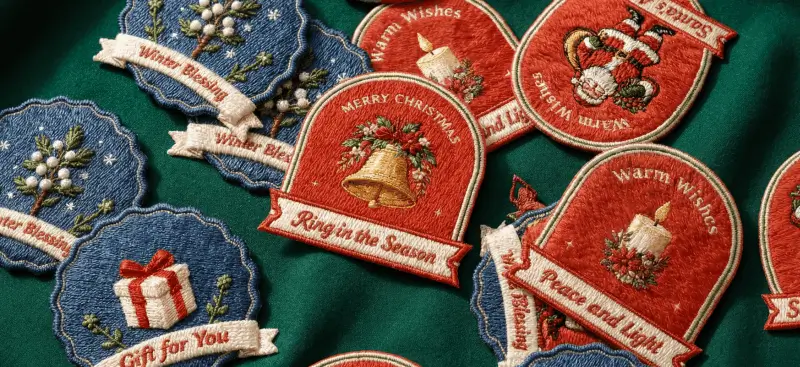
So we opened Kittl, took a single vintage Christmas badge, and used Kittl Flows with Seedream 4 to build an entire set of cohesive jacket badges in under an hour.
Why the Christmas badge design is so popular right now
If you have noticed more Christmas badges popping up across Etsy, Pinterest, and design libraries, there is a clear set of reasons behind the rise.
1. Rising holiday search demand
Google Trends consistently shows a sharp rise in searches related to “Christmas” beginning in mid-November and peaking in December. This pattern signals increased interest in all types of festive assets, including small-format graphics such as Christmas badge designs, labels, and emblems.
2. Strong market for badge-style graphics
Design resource platforms feature thousands of Christmas badge design vectors, indicating that designers regularly search for these assets during the holiday season.
Freepik, for example, maintains a large and diverse library of Christmas badge templates, which points to high demand for style-consistent, ready-to-use graphics (You even get a chance to sell the badges or badge templates that you made in Kittl at Freepik!)
3. Growing popularity of wearable holiday items
Jacket badges, enamel-style pins, and festive label graphics have become popular additions to seasonal outfits and gift packaging.
These small items allow customers and creators to express holiday identity in an approachable way, which keeps badge-inspired designs in demand across marketplaces and seasonal product drops.
4. Easy production and high creative flexibility
The Christmas badge design offers a unique balance of simplicity and creativity. Their small format makes them easy to produce, while still leaving room for thoughtful illustration and typography. Designers can quickly create multiple variations from a single template, turning one idea into a complete product set for jackets, packaging, stickers, and more.
What you need to make Christmas badge designs
You do not need a full illustration setup or a library of holiday graphics to create a complete badge set. Everything starts with a single layout and the right tools.
1. A Kittl account
Flows is built into Kittl, so you can generate consistent variations without needing any external software.
Each generation with Seedream 4 takes about 40 seconds and uses 10 tokens. If you are using Kittl for free, you can still begin creating with access to five projects, professional templates, and one-time 100 AI image generations.
We forgot to mention that you’ll get to enjoy more than one million photos, graphics, and fonts included at no cost.
2. Your starting Christmas badge design template
Here are the two templates we used in our workflow. Each one is powered by Seedream 4 inside Kittl Flows and already styled for vintage Christmas themes.

Vintage Christmas Badge Maker. Edit this Template

Vintage Christmas Badge Maker. Edit this Template
Both templates are flexible. You can replace the illustration, change the text, and keep the overall look consistent across every variation.
You only need one base badge. Flows handles the variations, maintains style alignment, and lets you produce a complete badge collection in a fraction of the time it would take to draw each one manually.
How to make a Christmas badge design using Kittl Flows Templates
You can turn one badge into a full collection in under an hour. Here is the exact process we used, written in simple steps so you can follow along.
Step 1: Open your base Christmas badge design

Start with one of the vintage badge templates (we are using this one), or your own design. This gives you the shape, color palette, and overall style.
Step 2: Send your base Christmas badge design to a Smartboard

In Kittl Flows, create a new Smartboard by clicking “Add Smartboard” under the Tools menu in the right panel. Add your badge to the first node. This tells Flows that you want every new version to keep the same design style.
Step 3: Write your first prompt
This is where the illustration and text change.
Here is the exact prompt used in the first variation:
Prompt 1
“Maintain the size, style, and colors. Replace the Christmas tree with a retro sleigh carrying presents illustration. Change the upper text to Happy Holidays. Change the lower text into Joyful Journey.”
Paste the prompt into the Smartboard. Choose Seedream 4 and keep the ratio at 1:1. Click Generate

Step 4: Create more Christmas badge design variations
Flows can do more than replace the illustration. You can also change the shape, the border, the colors, or even remove text.
Here are examples of different prompts you can use to explore more styles.
Prompt 2
“Maintain the size, style and colors. Replace the Christmas tree with a retro sleigh carrying presents illustration. Change the upper text into — Happy Holidays. Change the lower text into — Joyful Journey.”

Prompt 3
“Maintain the size, style and colors. Replace the retro sleigh into Christmas candle illustration With Florals. Change the upper text into — Warm Wishes. Change the lower text into — Peace and Light.”

You can also try prompts that adjust the entire Christmas badge design layout, like this:
Prompt 4
“Maintain the size and style. Keep the canvas background solid white. Change the badge shape fill color into deep blue and the outline into muted dark gold. Use a scalloped circular shape with the same decorative texture. Replace the main image with a gift box tied with red ribbon and small green floral around it. Delete the upper text. Change the lower text into Gift for You.”

This kind of prompt shows that you do not need to stay inside one Christmas badge design formula. You can create new shapes, new borders, new color palettes, and still keep everything consistent as long as the style language stays the same.
That’s the secret of creating 50+ Christmas badge designs in one sitting. Just make sure you find a good copy or quote for each!
Step 5: Export your badges

When your set is complete, export each Christmas badge design in the format that matches how you plan to use it.
If you are printing jacket badges, pin-back buttons, or sticker sheets, export your designs as PNG or PDF. These formats are ideal for print and keep the colors and details clean.
If you need your Christmas badge as a vector file, export it as an SVG. SVG export is available for Pro and Expert users, and it keeps every shape fully editable for scaling, vinyl cutting, laser engraving, or any workflow that requires vector paths.
Christmas badge prompts you can copy-paste for practice purposes

Need a quick idea to keep your badge set growing? Use these prompts in Kittl Flows to swap in new illustrations and text without changing your style.
- Santa: “Maintain the overall style. Change the badge shape to a rounded arch with soft corners. Change the fill to warm red and the outline to muted gold. Replace the main image with a vintage Santa holding a gift bag. Change the upper text to Santa Claus. Change the lower text to Merry and Bright.”
- Angel: “Maintain the overall style. Change the badge shape to a scalloped circle. Set the fill to light cream and the outline to soft gold. Replace the main image with a vintage angel with wings. Change the upper text to Christmas Angel. Change the lower text to Blessings to You”.
- Gifts: “Maintain the overall style. Use a circular badge shape. Change the fill to deep green and the outline to warm red. Replace the image with stacked gift boxes tied with ribbon. Change the upper text to Holiday Gifts. Change the lower text to Wrapped With Love.”
- Sleigh: “Maintain the overall style. Use a tall oval badge shape. Keep the fill soft beige and the outline dark red. Replace the main image with a vintage sleigh filled with presents. Change the upper text to Happy Holidays. Change the lower text to Joyful Journey.”
- Florals: “Maintain the overall style. Change the badge shape to a floral-edged circle. Set the fill to muted green and the outline to deep red. Replace the main image with holly leaves and red berries. Change the upper text to Winter Florals. Change the lower text to Warm Wishes.”
- Candles: “Maintain the overall style. Use a shield-shaped badge. Change the fill to warm cream and the outline to dark gold. Replace the main image with a candle and floral accents. Change the upper text to Warm Wishes. Change the lower text to Peace and Light.”
- Snow Scenes: “Maintain the overall style. Change the badge shape to a wide arch. Set the fill to icy blue and the outline to white. Replace the main image with a snowy house and trees. Change the upper text to Winter Night. Change the lower text to Silent Snowfall.”
- Reindeer: “Maintain the overall style. Use a classic circle badge. Change the fill to muted brown and the outline to soft gold. Replace the image with a vintage reindeer. Change the upper text to Reindeer Lane. Change the lower text to Season of Joy.”
- Bells: “Maintain the overall style. Change the badge shape to a starburst circle. Set the fill to soft red and the outline to bright gold. Replace the main image with Christmas bells with pine leaves. Change the upper text to Merry Christmas. Change the lower text to Ring in the Season.”
- Holy Night: “Maintain the overall style. Use a tall arch badge shape. Change the fill to deep navy and the outline to soft gold. Replace the main image with a nativity silhouette and a bright star. Change the upper text to Holy Night. Change the lower text to Peace on Earth.”
- Stars: “Maintain the overall style. Use a diamond badge shape. Change the fill to midnight blue and the outline to pale gold. Replace the main image with vintage stars and sparkles. Change the upper text to Starry Night. Change the lower text to Shine With Joy.”
- Snowman: “Maintain the overall style. Use a circular badge with a soft edge. Change the fill to light blue and the outline to frost white. Replace the main image with a classic snowman. Change the upper text to Snowman Day. Change the lower text to Let It Snow.”
- Christmas Tree: “Maintain the overall style. Use a pointed arch badge. Set the fill to forest green and the outline to warm gold. Replace the main image with a decorated Christmas tree. Change the upper text to Christmas Tree. Change the lower text to Winter Cheer.”
- Wreath: “Maintain the overall style. Use a round badge with a double-line border. Set the fill to soft cream and the outline to dark green. Replace the main image with a holiday wreath. Change the upper text to Holiday Wreath. Change the lower text to Joyful Season.”
- Gingerbread: “Maintain the overall style. Change the badge shape to a scalloped circle. Set the fill to warm brown and the outline to soft beige. Replace the main image with a gingerbread cookie. Change the upper text to Gingerbread Joy. Change the lower text to Sweet Holidays.”
Now that you have tried a few prompts, you can see that each follows the same pattern. Each badge becomes more interesting when you change the shape, the fill color, the outline, and the main illustration.
These small switches give you variety without losing the style of your original badge. Once you get comfortable mixing these elements, you can create as many Christmas badge designs as you want and still keep them feeling like part of the same collection.
Helpful vocabulary for writing better Christmas badge design prompts
Sometimes the hardest part of writing a prompt is knowing what words to use.
Maybe you cannot find the right color, you forget the name of a shape, or you want a certain “look” but do not know how to describe it. That’s why we created this simple cheat sheet to help spark some ideas.
| Colors | Shapes | Christmas vocabulary | textures | Adjectives | Art styles |
| deep red | circle | peppermint | grainy paper | cozy | vintage illustration |
| forest green | oval | candy cane | soft linen | muted | hand-drawn |
| warm gold | arch | nutcracker | embossed metal | glowing | retro print |
| muted gold | scalloped circle | sweater pattern | felt fabric | rustic | watercolor wash |
| icy blue | rounded square | hot cocoa | frosted glass | warm | mid-century |
| midnight blue | starburst | North Pole | knit texture | delicate | classic engraving |
| cream white | diamond | Santa hat | paper cut style | bold | soft pastel |
| soft beige | shield | sleigh bells | brushed metal | bright | textured grain |
| frost white | wide arch | ribbon bow | chalk dust | soft | warm retro |
| deep navy | tall arch | toy drum | velvet | festive | minimal line art |
| cranberry red | hexagon | garland | glitter specks | gentle | folk art |
| moss green | badge shape | pine cones | rough canvas | peaceful | storybook style |
| rustic brown | plaque | stockings | wood grain | simple | vintage label style |
| pale gold | banner shape | cozy cabin | parchment | calm | ink drawing |
| dusty rose | snowflake shape | ginger snaps | soft fibers | radiant | holiday poster style |
| copper orange | rounded badge | sparkle dust | metallic foil | textured | traditional print |
| warm brown | frame shape | fireplace | sand grain | subtle | classic emblem |
| muted teal | elongated oval | frosted window | chalkboard | rich | botanical print |
| bright gold | gothic arch | winter berries | smooth clay | gentle warm | nostalgic illustration |
| pine green | circle with border | sugar cookie | matte paint | clean | decorative etching |
| berry red | teardrop | winter market | suede | crisp | stamp-style |
| pinewood brown | badge ribbon | chimney smoke | wool knit | soft warm | poster print |
| spruce green | curved rectangle | holiday treats | thick paper | gentle dark | retro cartoon |
| snow gray | pointed oval | sleigh tracks | linen weave | snowy | soft sketch |
| buttercream | double circle | Mrs Claus | chalk texture | glowing soft | pastel poster |
| bronze gold | wide shield | toy soldier | metallic grain | bright cool | holiday label |
| silver white | rounded diamond | cookie house | foil shimmer | light warm | textured lino-cut |
| plum purple | cloud shape | winter spices | rough chalk | rich soft | warm graphic novel |
| ember orange | pointed plaque | festive parade | folded paper | bright calm | grainy illustration |
| olive green | long arch | toy workshop | brushed felt | peaceful warm | hyper-realism |
Now you have the vocabulary to write your Christmas badge design prompts, but there is still one big question.
Kittl Flows gives you five different models to pick from, so how do you know which generator matches the style you want?
- Nano Banana Pro: Great for warm graphic novel looks, rich comic shading, dramatic lighting, and hyper-realism when you need strong detail and depth.
- Nano Banana (Fast + Versatile): Ideal for retro cartoon styles, playful characters, bold outlines, and quick experimenting when you want a light and friendly illustrated look.
- Seedream 4: Perfect for pastel posters, soft sketch textures, dreamy holiday themes, and any badge that should feel warm, nostalgic, and painterly.
- ChatGPT Image 1 HD: Strong for ink drawing styles, fine line work, crisp symbols, and badges that need very close instruction-following and clean detail.
- ChatGPT Image 1: Best for warm retro graphics, hand-drawn effects, midcentury-inspired shapes, and soft illustrated designs that still feel expressive and clear.
Key takeaway: Christmas badge design is faster than you think
Once your Christmas badge design set is ready, you can turn it into items people enjoy during the holiday season.
Jacket badges are the most popular choice, but your designs can also be used for backpacks, Christmas outfits, printable sheets, classroom crafts, stickers, Etsy bundles, gift tags, and even scrapbooking.
- One base badge can create many consistent variations
- Changing the shape, fill color, outline, and main illustration adds variety
- Flows helps you build batch designs quickly and easily
- Your badges can become wearables, printables, or digital products
- You can create a full badge set even if you are new to prompting
Kittl Flows lets one design become a full collection in under an hour, giving you plenty of products you can use or sell across many formats.
The Smartboard handles the repetitive steps and keeps every version in the same style, so you get clean, creative results without drawing each design by hand.