Super Bowl 2026 hits fast. As the playoff race tightens around familiar contenders like the Chiefs, 49ers, Eagles, Bills, Cowboys, and Ravens, attention spikes everywhere.
In the U.S. alone, football reaches over 200 million viewers each season, and Super Bowl weekend consistently drives one of the biggest merch and print-on-demand surges of the year.
But let’s be honest. What if you don’t love the new Super Bowl look? Or what if you’ve seen the official Super Bowl 2026 logo design and already know you don’t want your merch to feel like a copy of it?
A lot of creators want to ride the hype without borrowing too closely from official visuals or risking licensing issues. When ideas run dry, it’s easy to feel stuck between playing it safe and sitting the season out entirely.
That’s where designing your own Super Bowl–inspired look makes sense. Super Bowl poster design, shirts, and social graphics still need to be bold, readable, and ready to launch while demand is climbing, but they don’t need official logos to feel powerful, particularly if your goal is making money online with design during high-demand moments like the Super Bowl.
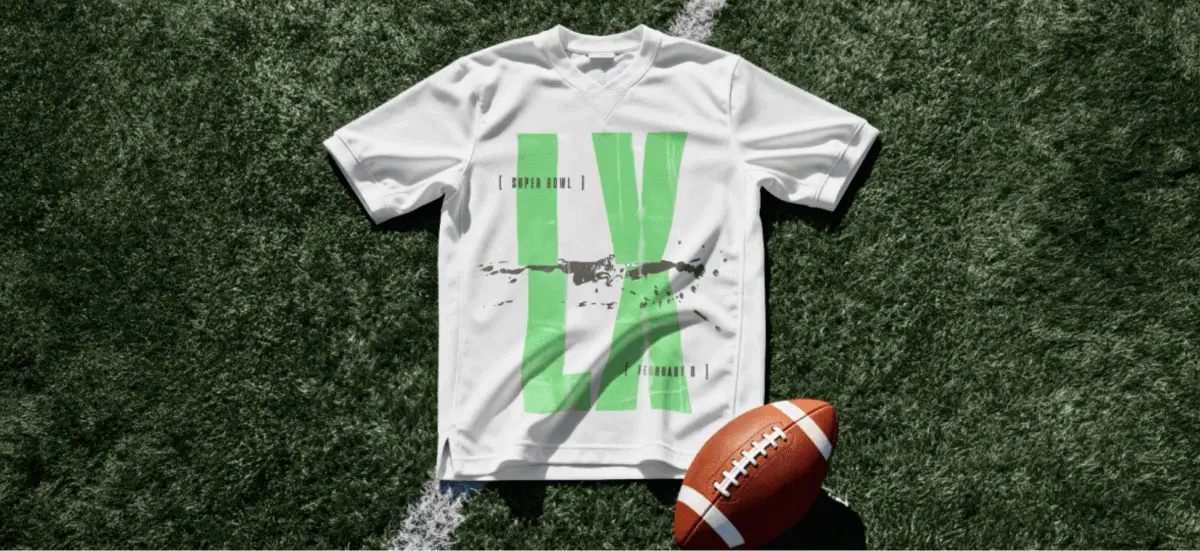
A cut text effect delivers that sharp, athletic energy through typography alone, making it ideal for original Super Bowl merch design that prints cleanly and stands out in crowded feeds. Don’t take our word for it. Try the cut text effect in Kittl and create your own Super Bowl 2026–inspired design without borrowing from the official playbook.
We’ve included a YouTube tutorial at the end to walk you through the cut text effect step by step.
Step 1: Add your Superbowl 2026 logo design text & choose a bold, condensed font in Kittl

To start building this cut text effect, open Kittl and press T to add text to your canvas.
Type a short, punchy copy that would work on Super Bowl 2026 merch, posters, or social graphics. For example, design something like “LX”, similar to how it appears in the 2026 Super Bowl logo design, or something short like a local team name.
Keeping the text minimal makes the cut text effect clearer and more impactful across merch and social formats.
Next, choose a condensed display font. Condensed fonts make the cut more visible and give your design that powerful, game-day look you see in Super Bowl–style graphics. Fonts like Skyrise Display work especially well, but any tall and blocky, condensed option in Kittl will do.
Want to create a fan t-shirt for your favorite football team instead? Read: 4 simple steps for eye-catching Seahawks custom football shirts
Step 2: Duplicate your text and set up layers for the cut text effect for your Super Bowl 2026 logo design

With your text set, the next step is preparing the layers that make this cut text effect in Kittl possible.
In Kittl, select your text and duplicate it so you have two identical versions sitting on top of each other. This is the foundation of the cut text effect and one of the reasons it’s so fast to build.
Rename one layer Top and the other Bottom. This small step makes a big difference. You don’t want to lose time clicking the wrong layer.
Once renamed, hide the Bottom layer so you can focus on shaping the top cut first.
For bold Super Bowl–style designs, clean layer control keeps the text effect sharp and readable. This setup is also what allows Kittl’s text effects to stay flexible, so you can adjust, remix, or reuse the design later for merch, posters, or social graphics without starting over.
Once your layers are duplicated and organized, you’re ready to start carving the cut that gives this headline its impact.
Step 3: Apply the cut text effect to the top layer

Now it’s time to start shaping the cut text effect. With the Bottom layer still hidden, select the Top text layer. Open the Text Effects panel in Kittl and apply the Color Cut decoration. This is where the split really starts to take form.
Set your main text color to something bold and solid, like black or a dark team color. Then turn off the first color in the Color Cut settings. What this does is isolate only the top portion of the text, which is exactly what you want when building a clean split text effect.
Use the Distance slider to control how much of the top half is visible. At this stage, you should see the top slice of your LX headline clearly defined. Once it looks balanced and bold, you’re ready to move on and reveal the bottom half of the cut.
Step 4: Reveal the bottom cut and lock in your Super Bowl 2026 logo design

Turn the Top layer off and select the Bottom text layer.
Apply the Color Cut decoration again, but this time reverse the setup so the lower portion of the text is revealed. Set the top cut color to match your background. If your canvas is white, use white. If you’re working with a bold background color, match it exactly.
Use the Distance slider to bring the bottom half of the text into view, then turn both layers back on. At this point, the full cut text effect should snap into place.
For a short headline like a team name or the LX logo, this approach creates a strong, balanced look that feels right at home in Super Bowl 2026 logo design, posters, and merch. Once both layers are visible and aligned, you’ve built a flexible headline using text effects in Kittl that can be reused, recolored, and resized quickly for different game-day designs.
Step 5: Fine-tune, customize, and prep your Super Bowl 2026 logo design for merch and social

With the full cut text effect in place, this final step is about polishing the design so it’s ready for real-world use.
Start by slightly adjusting the Angle setting in the Color Cut controls. Even a small tilt can make the cut feel more dynamic and “sporty,” which works especially well for Super Bowl 2026 graphics.
Next, experiment with color. Use Project Colors in Kittl to quickly test different combinations that fit team palettes or game-day themes. This is where text effects in Kittl really shine. You can adapt the same LX design for multiple teams, backgrounds, or product types without rebuilding anything.
Once you’re happy with the result, export your design and put it to work.
For Super Bowl merch design, keep colors print-friendly and make sure the cut remains clear at smaller sizes. For Super Bowl poster design or social graphics, you can push contrast a bit further to grab attention in feeds.
Key takeaway: How to create your own Super Bowl 2026 logo design to make money
Feeling the Super Bowl 2026 design rush already? A cut text effect in Kittl gives you a fast, repeatable way to design merch and social graphics that actually stand out.
- Type your copy and pick a bold, condensed display font so the cut stays crisp
- Duplicate the text so you have two identical layers. Rename them Top and Bottom
- Hide Bottom, select Top, then apply Effects → Color Cut. Turn off the lower color so you’re only showing the top slice of the text.
- Hide Top, select Bottom, apply Color Cut again, and set the cut color to match your background so the top half disappears and the bottom slice remains.
- Turn both layers back on and adjust Distance (and a small Angle tweak) until the cut line looks clean, sporty, and merch-ready.
If you want to keep a side hustle while the 2026 Super Bowl hype is heating up, this setup makes it easy to ship fast without overthinking, especially if you’re exploring easy design business ideas you can start from home.
Open Kittl, try the cut text effect, and put it to work on your next Super Bowl drop.