New to Kittl? This beginners tutorial shows you how to start fast and design with ease, no bloat, just pro results.
If you’ve used design tools before, Kittl feels familiar but smoother. Learn to set up projects, use text effects, export vectors, and tap into AI tools. Whether it’s for personal work or clients, Kittl gives you full control — without the usual friction.
What is Kittl? Here’s everything you need to know about Kittl
If you’re wondering about Kittl and why so many designers are talking about it, here’s the quick rundown.
Kittl is a professional-grade design tool built to help creators of all levels design faster, smarter, and with more flexibility. Based in Berlin and founded in 2020, the platform combines precision design capabilities with ease of use, making it a go-to solution for everything from logos and merch to packaging, social media content, posters, and full brand systems.
What sets Kittl apart? It’s fully browser-based — no installs, no lag. Start designing instantly with free templates and export options. The Pro and Expert plans unlock licensed fonts from Monotype, AI tools, and commercial use rights.
Looking to contribute your own templates or design assets? You can also apply to become a Kittl Contributor and share your work with our growing global community now over 5 million creators!
Why trained designers are switching to Kittl (and why it clicks for newcomers, too)
Kittl is built for people who expect precision and flexibility but are tired of clunky workflows and tool overload. It gives you the creative control you’re used to, with a much smoother experience.
Why you should choose Kittl as your design tool
- Pro templates that spark real ideas, not placeholder
- Drag-and-drop tools with full control: guides, layers, grids
- Advanced typography: path effects, textures, outlines
- Native AI tools: BG Remover, Image Generator, Smart Layout
- No installs. Design from any device, instantly.
- Built for real work, not just mockups.
If you’re coming from a traditional design suite, you’ll feel right at home — but move a whole lot faster. Let’s continue to start our beginners tutorial here:
Beginners tutorial : How to create your first design in Kittl
Wondering how Kittl works? You’re not alone.
That’s why we created a clear, practical beginners tutorial to walk you through the basics. Watch the intro video to see how to use templates, customize text and graphics, and export designs. Then follow the step-by-step guide below to get hands-on inside the Kittl editor.
Start designing faster — with no confusion.
1. Go to Kittl start with a template or blank canvas
First step of your beginners tutorial, you want to go to Kittl.com. Youll be automatically logged in to your account, or if you havent had one yet, youll be directed to create your free account. Once youre in your Kittl workspace, you’ll land on the Templates page, think of it as your creative jumpstart.
You can:
- Search by keyword (try t-shirt, logo, label, or flyer)
- Filter by category like branding, merch, social posts, packaging, or client-ready deliverables
- Or, if you prefer full control, just hit Create New Project to open a blank canvas
Kittl templates are editable and built for real use. Swap colors, fonts, or graphics to fit your brand — or build your own layout from the ground up.
2. Customize text with Kittl’s advanced typography tools
Click any text element to open the full typography panel—this is where Kittl stands out.
You get smart font pairings, text effects like curve, arch, wave, and path distortion, plus layered styles like shadows, outlines, and textures.
Live preview lets you test fonts without wrecking your layout. Whether it’s branding or poster design, you get pro-level control effortlessly.
3. Add graphics or upload your own
In this beginners tutorial, we’ll also show how Kittl meets your needs, whether it’s logos, merch, posters, or full brand systems.
- Need visuals? Use Kittl’s Elements tab
Access curated, high-quality vectors: icons, illustrations, textures, and frames, ready to drag into your design. - Want to upload your own?
Import logos, product shots, or SVGs. Everything stays editable inside Kittl’s canvas. - No asset? Generate one
Use Kittl’s AI Image Generator to create custom visuals from text prompts — perfect for fast concepts or mood boards.
4. Customize colors, layout, and details
Remember this during your beginners tutorial, everything on your canvas is fully adjustable — down to the pixel. You can fine-tune colors, organize layers, adjust transparency, and dial in alignment or spacing without the usual guesswork.
Here are a few tools that make it smooth:
- Project Colors: Build and reuse a consistent palette across your entire project
- Snapping + Smart Guides: Align elements effortlessly while keeping your layout clean and intentional
- Hold ALT: Instantly measure the distance between objects with on-canvas distance linesa lifesaver for grid lovers
5. Download and share
Once your design’s ready, click Download to export as PNG, JPG, PDF, or SVG. You can also copy a public link or share it for feedback.
And that’s it — you’ve completed your beginners tutorial in Kittl!
Kittl features that save you serious time
1. Play with pro-level text effects
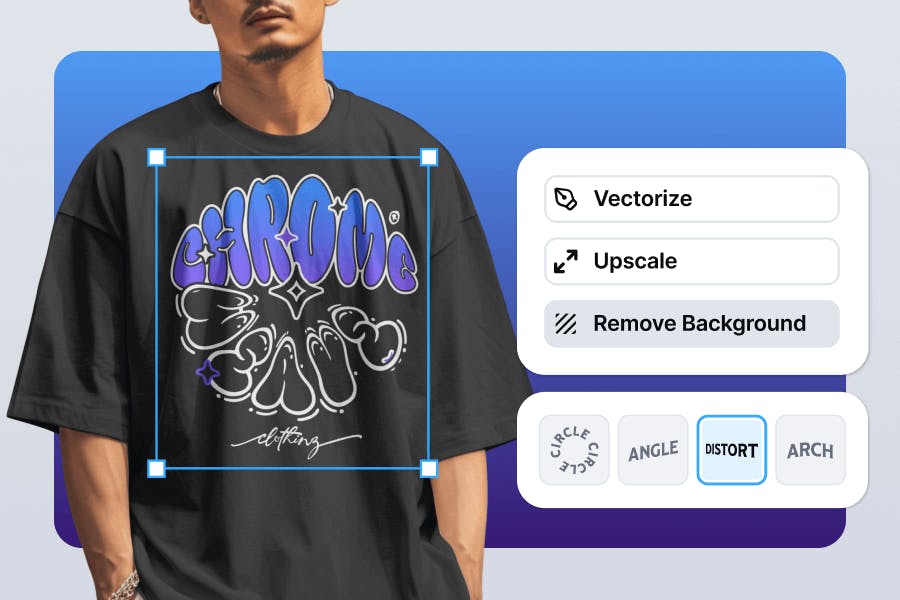
Typography is one of the most powerful tools in design, and Kittl takes it to the next level. With the Text Effects panel, you can apply curved, warped, arched, or wavy transformations with a single click.
Want your headline to rise, bulge, or follow a custom path? Just drag the handles and watch it come to life. Plus, you can combine effects like shadows, outlines, textures, and 3D depth for rich, layered lettering that still looks crisp and editable.
2. Supercharge your workflow with AI tools
From designing from scratch to improving what you already made, Kittls AI-powered tools give you a creative boost at every step. You’ll find AI tools like the Image Generator, Background Remover, Vectorizer, and Erase & Fill, all available right inside your canvas. These tools help you move from rough draft to polished design without jumping between tabs or tools.
3. Access thousands of illustrations, icons, and textures
Kittl comes packed with an ever-growing Content Library full of high-quality graphics you can drag and drop into your projects. This includes vintage ornaments, modern icons, botanical illustrations, decorative frames, textured overlays, and moreperfect for posters, apparel, logos, and packaging.
Want to bring in your own brand assets? No problem. You can upload your own elements (SVG, PNG, JPG) and use them seamlessly across all your projects.
4. See your work in context with mockups
Need to show off your design on a T-shirt, coffee cup, or poster frame? With Kittls Mockup Generator, you can turn any design into a product preview in seconds.
It’s all built into the Kittl Editor—no separate tool is needed. Choose from mockups for apparel, prints, packaging, and more to visualize how your design looks in real life. This is perfect for Etsy sellers, POD creators, or anyone needing presentation-ready visuals.
5. Get pixel-perfect layouts with rulers and guides
Visual alignment can make or break a design. That’s why Kittl includes powerful Layout Tools like rulers, guides, and snapping functionality. Hold ALT to activate Canvas Distance Lines, letting you measure spacing between objects in real time.
Add custom guides or toggle rulers on and off to build precise, well-balanced layouts. Whether you’re designing for web, print, or social media, these tools help your composition feel intentional, not just eyeballed.
Got questions about Kittl design software? We’ve got you covered
Before jumping into your first full project after this beginners tutorial, you might be wondering about the fine print — like plan limits, font uploads, or commercial rights.
Totally fair. Here are the most common questions new Kittl users ask (and probably what you’re thinking too) :
1. Can I use Kittl for free?
Yes! Kittl offers a free plan with access to core design tools, templates, and the editor. That said, if you’re looking to take things to the next level, Pro and Expert plans unlock even more.
You’ll get additional projects, increased cloud storage, more AI credits, and access to advanced tools like font uploads, premium templates, and commercial licensing.
2. How do I create a Kittl account? (Kittl sign up)
Go to kittl.com and click the Sign up button in the top-right corner. From there, you can create a free account in a few ways: sign up with Google or Facebook, or manually enter your name, email, and password.
Once you’ve completed the Kittl sign up process, you’ll land in your personal dashboard where you can start designing right away using the Kittl free plan. You’ll get access to the Kittl free plan, which includes thousands of editable templates, basic export options, and core design tools.
No credit card is required to get started, and you can upgrade to Pro or Expert plans anytime if you need more features like font uploads, commercial licensing, or AI tools.
3. How do I log in to my account? (Kittl login)
To return to your workspace, just head to kittl.com and click Log in in the top-right corner. Then, sign in using the method you registered withemail and password, Google, or Facebook. Once logged in, you’ll be taken straight to your dashboard where all your saved projects live.
Or, you could just type in kittl.com in your browser, and Kittl will automatically take you straight to your workspace instead of the homepage. No extra clicks, no distractions just right back to where you left off.
Forgot your password? No problem — just click the reset link on the login screen and you’ll be back in the editor in no time.
4. Can I upload my own fonts?
Yes, font upload is supported, but only for Pro and Expert users. If you’re working with custom brand fonts or just want to expand beyond Kittl’s built-in library, this feature makes a big difference.
You can upload .TTF (TrueType Font) files directly into your project and use them just like native fonts inside the editor.
To see the full walkthrough and tips for managing your uploads, check out our guide on how to upload your fonts to Kittl.
5. Can I use my designs for commercial projects?
Absolutely—as long as you’re on a paid plan. Free users can use their designs for personal projects only. With a Pro or Expert subscription, you can use your designs on merch, client projects, marketing campaigns, and more.
For the full breakdown of what’s allowed, read our commercial licensing terms to make sure you’re covered.
6. What file types can I export from Kittl?
Kittl supports multiple export formats, including PNG (with or without transparency), JPG, PDF, and SVG. These cover most use cases from social media graphics and client presentations to print-ready posters and merch.
Not sure which format is best for your project? Check out our guide on how to choose the right export format it breaks down when to use vector files like SVG versus raster files like PNG or JPG, so you can pick the right one every time.
7. Can I use Kittl on mobile?
Currently, Kittl is optimized for desktop and tablet use. A mobile-friendly editor is in the works, but for now, you’ll get the best experience on a larger screen where you can access all the precision tools.
Create your next project with Kittl design tool
If you’re finished with this Kittl beginners tutorial and already comfortable with advanced design tools, Kittl gives you that same level of creative control — without the heavy setup or steep learning curve. You’ll find familiar features like vector editing, layered layouts, advanced typography, and export options that fit both print and digital needs.
What makes Kittl different is how fast you can go from idea to final design. No more bouncing between apps or setting up complex files just to try something out. Whether you’re creating for clients, building a portfolio, or testing new product ideas, Kittl lets you work at the speed of inspiration.
Want to try your first design? Grab this cinematic movie title text beginners tutorial — perfect for testing Kittl’s text effects in minutes.