The hardest part of running a print-on-demand store isn’t coming up with ideas. It’s turning those ideas into finished designs fast enough to keep up with what’s selling – and doing it consistently.
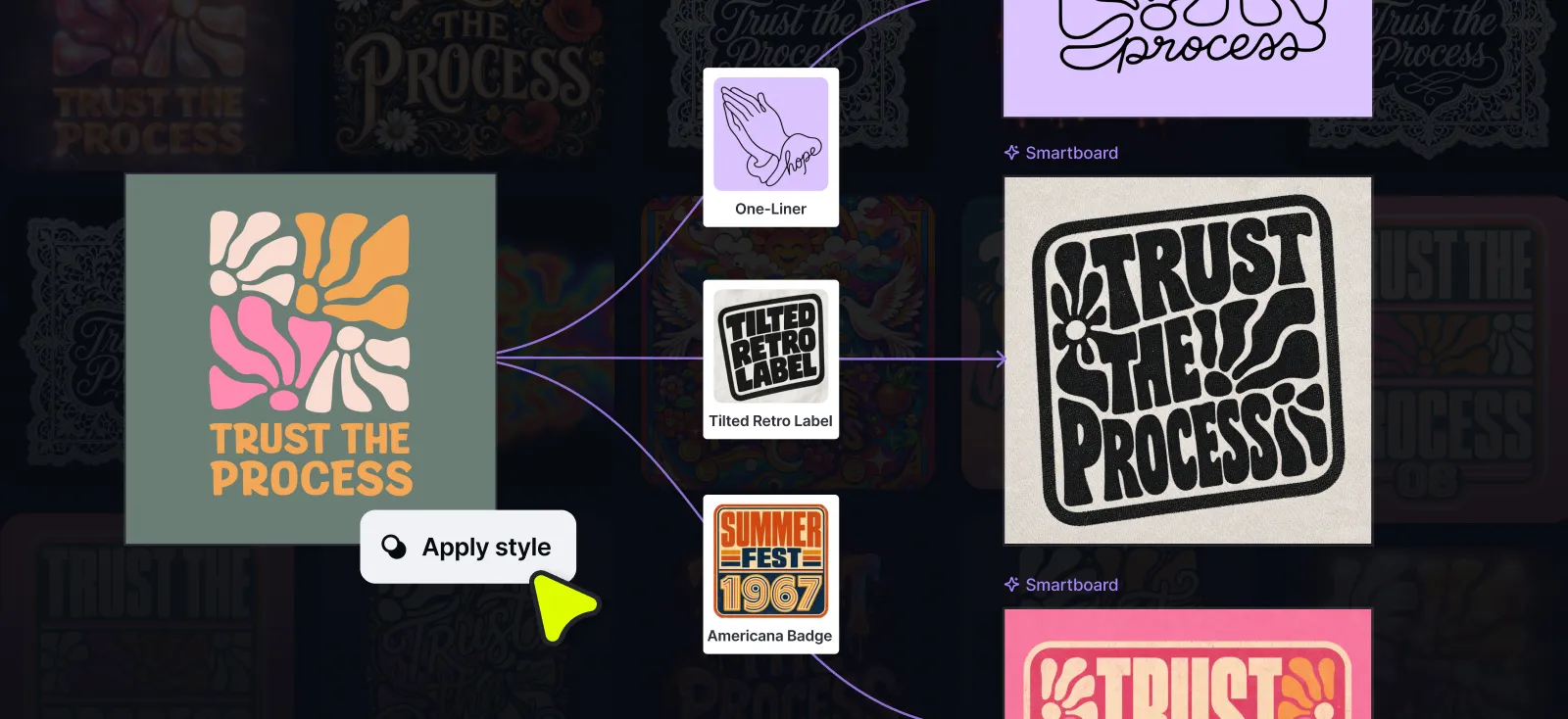
Remix Styles is built for that problem. Take anything on your board, apply a style, and get a print-ready result in minutes. No prompt needed. No starting from scratch. Just a new direction from something you already have.
What is Remix Styles?
Remix Styles lets you apply a visual style directly to any element on your board – a photo, a piece of text, a vector, or a full artboard. Select your reference, choose a style, and Kittl generates a new output in the same place you’re already working.
It’s not a separate tool or a new workflow to learn. It lives inside the AI image input you already use. The logic is simple: if something is on your board, you can style it.
What makes it different from just generating a new image is the starting point. You’re not describing something from scratch and hoping the output matches what you pictured. You’re handing Kittl something real – a design you made, a photo you like, a piece of text – and selecting the direction to take it. The result is faster, more controlled, and a lot closer to what you actually want.
How to get started
- Open the AI Image panel or your AI Image board
- Select or upload a reference
- Choose a style and let Kittl generate
No prompt needed. If you want to guide the output further, you can add one — but most of the time, the reference and the style do all the work.
Two ways sellers are using it
1. Scale what’s already selling
You have a design that works. Customers are buying it. The instinct is to leave it alone – but the smarter move is to use it as a launchpad.
Run your bestseller through a few styles and you have new listings, all rooted in something you already know converts.
This is where Remix Styles really earns its place in a seller’s workflow. You’re not guessing what might work – you’re extending something that already does.
2. Test a new idea before you invest in it
Every seller has a backlog of concepts they haven’t built yet – ideas that seem good but aren’t worth hours of design work until you know they’ll sell.
Remix Styles changes that. Start with the roughest possible input. Type the words. Drop in a basic element. Apply a style. What comes back looks like it came from a professional designer, not hours of trial and error.
Drop it straight onto a mockup. Put it in your store. See if it gets clicks before you spend another hour refining it. If it sells, go deeper. If it doesn’t, you’ve lost minutes, not days.
This is what fast iteration actually looks like in practice – not rushing the design process, but compressing the gap between idea and testable product.
What you can use as a starting point
One of the most useful things about Remix Styles is how flexible the input is. You’re not limited to polished finished work. Anything on your board is a valid starting point:
- Images – photos, AI-generated images, reference visuals
- Text – a word, a phrase, a headline
- Elements and vectors – icons, shapes, illustrations
- Templates – an entire layout, restyled from one click
- Full artboards – your whole design, transformed at once
The less finished your starting point, the more dramatic the transformation tends to be. A plain word run through a typography style can come back looking like a complete graphic. A simple icon can become a full clipart-ready illustration.
What you get back
Depending on the style you choose, the output is either an image or an editable vector.
One input. Any direction.

Tobias Saul is a co-founder and chief product officer at Kittl, where he leads the vision for making professional design tools simpler, smarter, and more inspiring to use. With a background in typography, lettering, and graphic design, Tobias brings a deep appreciation for craft and detail to Kittl’s product and brand experience.