Most time spent with AI is trial and error. Trying a prompt, getting something off. Adjusting the settings, generating again. Getting closer, but not quite. Running out of credits before you get to something you’d actually use.
AI Workflows removes that entirely.
What is AI Workflows?
AI Workflows is hundreds of ready-to-use AI flows, each built by Kittl’s design team. Not templated. Not generic. Built, tested, and shaped with real taste by people who know what good looks like, and what actually sells.
You pick a workflow, drop in your photo or idea, and get a result that’s already been pointed in the right direction. No prompt to write. No settings to figure out. No guessing whether the style is going to work.
With AI Workflows drop in your input, get a result that’s already pointed in the right direction.
How it works
Head to the AI Hub and open the Workflows. You’ll see flows organized by job: merch, product visuals, marketing, branding, mockups, video.
Pick one. Each workflow shows you exactly what it does and what input it needs before you start.
From there:
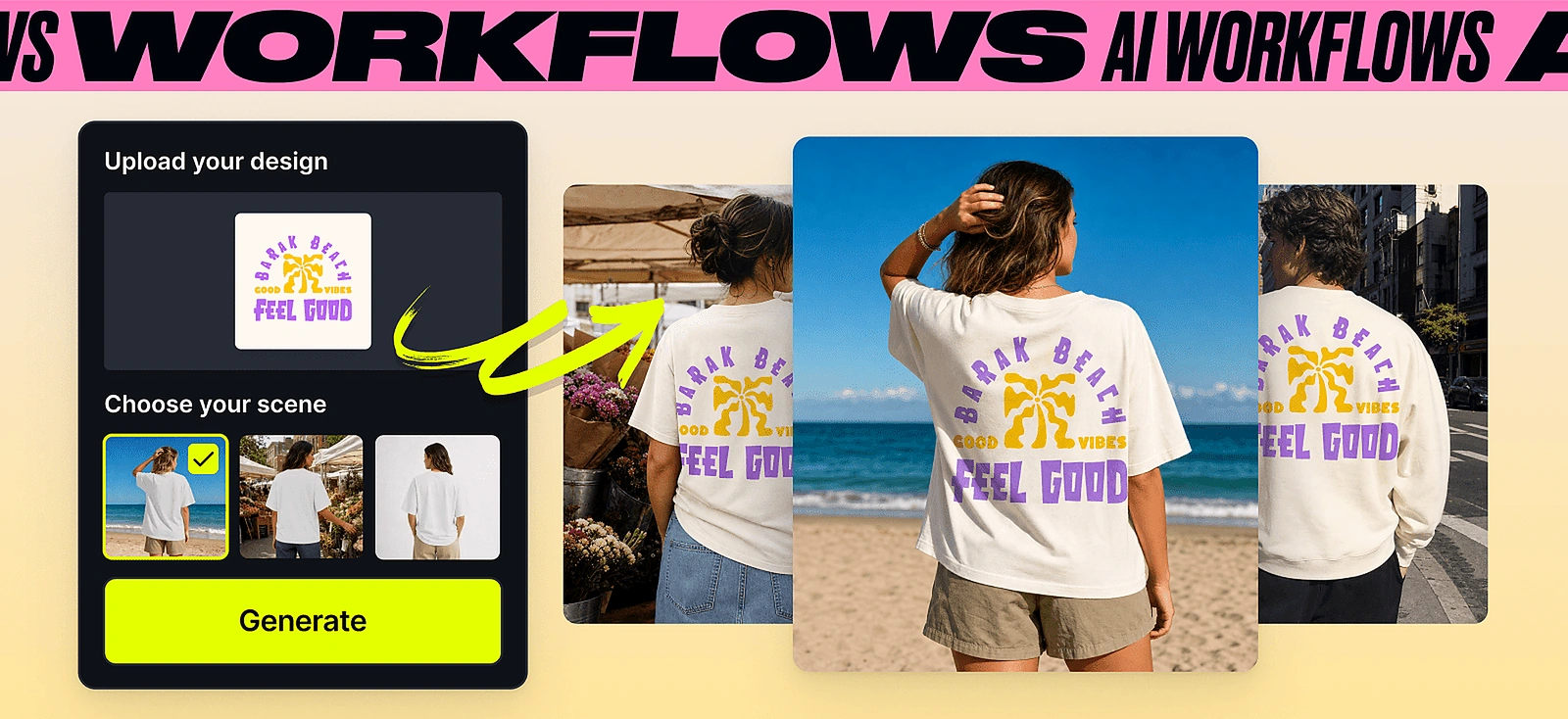
- Upload your photo, design, or describe your idea.
- Choose how many variations you want to generate.
- Hit generate, the workflow runs in the background. You don’t have to wait for it: keep working on something else in Kittl while it processes.
- Open any result straight in the editor, or export it.
The direction is already figured out. You’re choosing from approaches that are already good, not trying to reverse-engineer what good looks like on your own.
Still got questions? Watch the full walkthrough to see AI Workflows in action.
AI Token cost
The exact AI token cost will depend on the workflow you selected. Each workflow shows you how many AI tokens will use upfront, so there are no surprises.
What you can create with AI Workflows
For print-on-demand sellers
Merch
You know the niche, you know the vibe, but getting to a graphic that actually works on a listing is where things slow down. Pick a style, drop in your concept, and get something listing-ready, shaped by people who know what sells.
Mockups
Your design is done. Now you need it on a product, in a scene, ready to list. Upload your design, pick the product and setting, and get a shot ready to go straight to your store. No switching tools, no re-uploading.
UGC videos
Short-form video drives traffic to listings, but making it usually means a separate app or a setup you don’t have time for. Drop in your design and get motion content that looks native to the feed in minutes.
For product-based brands
Product visuals
Upload your product, pick the scene, and get imagery that looks campaign-ready. The kind of shot that usually takes a studio, a photographer, and a half-day. Done in minutes, in the same place you do everything else.
Marketing
Take your product and turn it into content your ads and social actually need. Layouts and formats shaped by people who’ve looked at what performs, not what just looks good.
Social media videos and UGC
Short-form video that looks like it came from a brand with a proper content team. Drop in your product and get something ready for the feed.
Extra tools
Useful for quick, specific jobs across any category.
- Match a merch style: upload a design you like, get yours built in the same visual direction.
- Change product color: swap colorways across your product without rebuilding the design.
- Swap background: drop your product or design into a new scene in one step.
- Style your logo: take an existing logo and push it into a new visual direction.
And much more for any specific use cases in the Tools section.
A library that keeps growing
New workflows drop every week. Across merch, branding, product visuals, mockups, and video.
And if we’re missing one you’d actually use, we want to know. Tell us which workflow to build next.
Still yours to finish
Every result opens straight in the Kittl editor. Adjust it, adapt it, combine it with your existing templates, brand kit, or assets. The workflow gets you to a strong starting point. Where you take it from there is up to you.
AI Workflows also works on mobile, so you’re not tied to a desktop to get started.

Tobias Saul is a co-founder and chief product officer at Kittl, where he leads the vision for making professional design tools simpler, smarter, and more inspiring to use. With a background in typography, lettering, and graphic design, Tobias brings a deep appreciation for craft and detail to Kittl’s product and brand experience.