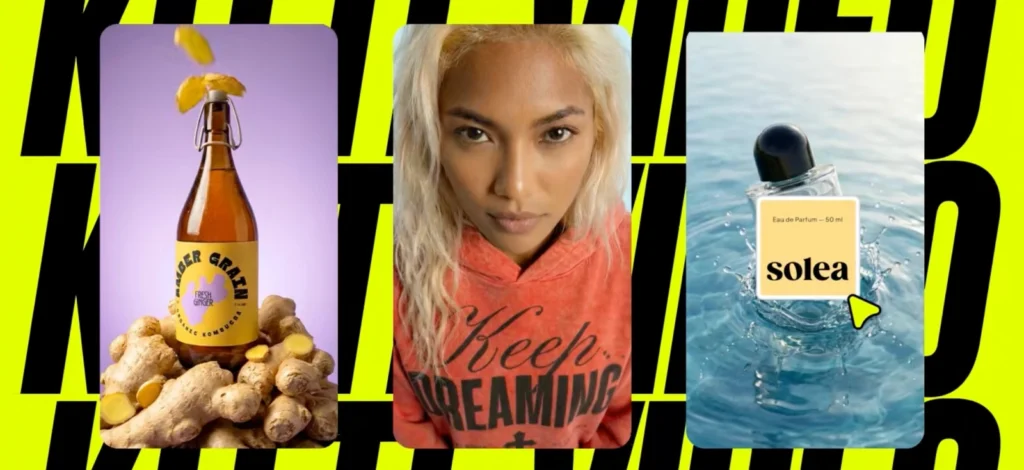
We know what you are thinking: “Can AI really make realistic images?”
When it comes to AI realism, it’s hard not to talk about the viral AI tribute to Pope Francis that’s been circulating on social media.
You might’ve seen it — someone used AI to visualize his entire life, from a child in Buenos Aires all the way to the Vatican and beyond. It was cinematic, emotional, and eerily lifelike.
As someone just stepping into the design world, it’s easy to get overwhelmed by tools and settings. That’s why we’re ranking 10 of the most impressive AI image generators in 2026 — and what they each do best.
What makes an AI image look realistic?
BeBefore we start reviewing, let’s talk about the requirements.
Realism in AI image generation is a mix of things. Some technical, some artistic, and most importantly, it’s about believability.
Think about the way light hits a surface, how eyes reflect emotion, or how background elements align with perspective. These are the kinds of details that separate a polished image from something that screams “AI-made.”
If you’ve been keeping up with our latest updates — from Flux Pro’s launch to the recent super-fast Nano Banana generator— you know that Kittl’s been pushing hard to make AI faster, smarter, and yes, more realistic.
That’s not a fluke.
It’s the result of better training data, stronger style targeting, and, of course, the faster rendering pipeline.
So, what contributes to realism in AI-generated art?
- Lighting and shadows that behave naturally: Without believable lighting, even the most detailed image can fall apart. You want shadows that make sense based on the light source, and highlights that match the material they’re bouncing off.
- Proportions and anatomy: This one’s big—especially in portrait or figure work. Anatomically correct hands, eyes, and body parts are tough for many generators.
- Background coherence: A blurry or mismatched background instantly gives away that something’s off. Realism comes from the harmony between subject and setting, not just one looking good on its own.
- Material and texture accuracy: Whether it’s fabric, skin, glass, or stone, realistic images need textures that feel tangible. You want to “feel” the surface just by looking at it.
- Prompt specificity: If you’ve read our tips on crafting better AI prompts for creatives, you know how much wording can influence the result. Specificity in your prompt—like saying “a soft, warm sunset casting long shadows over a quiet forest road”—can dramatically improve realism.
Getting a realistic image is as much about what you ask the AI to create as it is about the engine you’re using. And if you’re working on brand visuals, packaging mockups, or character concepts, realism isn’t just a preference—it’s often a necessity.
Get free tokens and check out our Free AI Generator
What is the best realistic AI image generator?
It’s the big question everyone’s asking — and the answer depends a little on what you’re looking for. Realism in AI-generated images can mean different things to different people.
For some, it’s about lifelike portraits with natural lighting and perfect proportions. For others, it’s about generating mockups or still life compositions that look like they were captured with a DSLR.
The good news?
We’re at a point now where several AI tools are seriously pushing the limits of what “realistic” looks like. From cinematic lighting to photorealistic skin textures, these platforms are evolving fast, and some of them are getting shockingly good at faking reality.
Below, we’ve rounded up the most talked-about contenders. Let’s get into it.
1. Best realistic AI Image Generator. Kittl (Nano Banana)

Kittl’s latest image generation model, Nano Banana, is now live inside the Kittl Editor. As explained in Kittl’s official announcement, Nano Banana is designed for high-quality, photorealistic image generation directly inside real design workflows.
If you’re a beginner designer exploring AI tools, this is a big deal. Nano Banana doesn’t just generate images — it’s built to work inside your existing design process. You can generate visuals, place them on your canvas, and continue designing without jumping between tools.
According to Kittl’s official product update, Nano Banana was developed with a focus on high-quality, photorealistic outputs that are ready for real design use. It handles complex lighting, clean subject separation, and background coherence more accurately than previous models.
1. Lighting & shadows: Nano Banana delivers cinematic lighting straight out of the box. Highlights, reflections, and ambient light behave more naturally, so you don’t need to fine-tune prompts just to avoid flat or overexposed results.
2. Proportions & anatomy: Nano Banana also improves how human figures, animals, and objects appear in terms of shape and structure. According to early tests by AI art communities, the model produces more natural hand poses, balanced body proportions, and accurate face angles — issues that older models often struggled with. Thanks to Kittl’s editor integration, you can also fine-tune the aspect ratio or adjust placement on your canvas without distorting the composition.
3. Background coherence: If you’ve ever used a generator that mashed together strange or conflicting background elements, you’ll appreciate this: Nano Banana keeps scenes visually consistent.
4. Material & texture accuracy: One of the most noticeable upgrades is in texture rendering. Nano Banana now generates more realistic surfaces — whether it’s metallic reflections, fabric folds, skin detail, or foliage.
5. Prompt specificity: Nano Banana responds especially well to clear, descriptive prompts. As outlined in Kittl’s official guide on how to write effective AI design prompts, focusing on visual details, style cues, and intent makes it much easier to get accurate, on-brand results without relying on overly technical instructions.
2. Realistic AI Image Generator: Midjourney

Midjourney has become famous for its stunning, often indistinguishable from reality visuals. Here is how it fares against our 5 criteria:
1. Lighting & shadows: Midjourney excels at producing natural, cinematic lighting. Scenes often have lifelike shadow falloff and highlights, making renders feel like real photographs.
2. Proportions & anatomy: This model was among the first to tackle tricky human details (it famously fixed the “AI with 6 fingers” problem). Users report that Midjourney v6.1 and v7 consistently produce believable human figures with correct anatomy. Faces, hands, and body proportions look convincing, which is critical for portrait work and character design.
3. Background coherence: The model’s photorealism and complex scene recreation are highly praised. That said, Midjourney sometimes emphasizes artistic flair: it might embellish backgrounds with atmospheric effects or stylistic elements that weren’t explicitly prompted, purely to enhance aesthetics.
4. Material & texture accuracy: Midjourney v6.1 and v7 in particular deliver photorealistic surface details – e.g., lifelike food textures or animal fur – that rival real photography. This makes it great for product mockups or any scenario where texture fidelity is key.
5. Prompt specificity & responsiveness: Users often note that while it produces gorgeous images, it can still prioritize overall “vibe” over ultra-specific micro-details — but prompt precision is notably stronger in v7 than earlier versions, especially for longer, more detailed instructions.
In practice, Midjourney tends to pick out a few key nouns from your description and stylize them beautifully, but ultra-specific requests (e.g., a very exact outfit or minor background element) can get lost.
On the plus side, Midjourney offers advanced commands and parameters (aspect ratios, stylistic controls, image references, etc.) that give experienced users more control over results. If you need stricter adherence, Raw Mode and lower stylize values are the two most reliable levers.
3. GPT-4o image generation (a.k.a. “Images in ChatGPT”)

Image from DALL-E 3

Same prompt by GPT-4o image generation
OpenAI’s GPT-4o image generation is now the primary image creation system inside ChatGPT. OpenAI officially introduced this capability in 2025 as part of its rollout of native image generation in GPT-4o, replacing the need for a separate image model.
1. Prompt specificity & responsiveness:
GPT-4o strongly favors prompt obedience. Long, detailed instructions are parsed carefully, and small details are more likely to be respected than with style-forward models. OpenAI positions this behavior as a core design goal in its overview of instruction-following image generation.
2. Lighting & shadows: GPT-4o produces realistic lighting and shading with a clean, controlled look. It handles complex lighting scenarios such as reflections and backlighting well when prompted. Its image generation benefits from ChatGPT’s contextual understanding, as noted in Search Engine Journal’s coverage of GPT-4o image creation.
3. Proportions & anatomy:
GPT-4o is reliable with human and animal anatomy. Faces, hands, and body proportions generally appear correct, with fewer logical errors than earlier systems. According to InfoQ’s analysis of GPT-4o’s multimodal image capabilities, the model leverages broader language reasoning to avoid common structural mistakes.
4. Background coherence:
The model excels at scene logic. When prompts describe multiple objects or actions, GPT-4o usually preserves spatial relationships and avoids surreal artifacts. This emphasis on correctness over embellishment is highlighted in Search Engine Journal’s breakdown of how GPT-4o handles complex scenes.
5. Material & texture accuracy:
GPT-4o produces believable materials and textures when explicitly described. It performs especially well with functional realism, such as packaging, signage, and readable typography on objects. As outlined in OpenAI’s announcement of GPT-4o image generation, the system prioritizes clarity and usability over exaggerated surface detail.
For example, if you specify the exact type of armor on that medieval knight, DALL·E 3 is more likely to attempt it, whereas Midjourney might give a generic armor unless you iterate.
The trade-off is creativity: DALL·E 3 is more literal and less likely to embellish or “enhance” your prompt with its own style. In terms of raw responsiveness, designers love that DALL·E 3 “does what it’s told” – you describe it, it creates it, with minimal fuss.
4. Freepik “Mystic”

Freepik’s Mystic is a photorealism-focused image model built on the Flux architecture and fine-tuned by Freepik in collaboration with Magnific. It has gained attention for producing highly realistic images with strong prompt fidelity, as outlined on Freepik’s official page about Mystic AI image generation.
1. Prompt specificity & responsiveness:
Mystic is known for strong prompt adherence. Freepik positions prompt fidelity as a core feature in its explanation of how Mystic interprets and follows detailed prompts. This makes it ideal when the desired outcome is clearly defined. The trade-off is creativity: Mystic rarely embellishes or adds stylistic flair unless explicitly instructed, which can make results feel plain if prompts are minimal.
2. Lighting & shadows:
Mystic renders light and shadow with a natural, convincing feel. When prompted with specific atmospheres or times of day, it reliably captures the intended mood. Reviews of Freepik Mystic’s realism-focused output highlight how golden hour lighting, reflections, and specular highlights are handled with minimal artificial glow, helping images feel photographic rather than stylized.
3. Proportions & anatomy:
As a model optimized for photorealism, Mystic produces human figures with high anatomical accuracy. Freepik explains in its breakdown of how Mystic was fine-tuned for realistic people and faces that the model was trained to preserve natural proportions, facial asymmetry, and skin detail. Hands, facial features, and body structure generally appear correct, sometimes including imperfections like wrinkles or blemishes that reduce the typical “AI-smooth” look.
4. Background coherence:
Mystic follows prompts very literally, which results in coherent, grounded backgrounds. When users describe environments in detail, the model tends to place background elements logically, maintaining perspective and depth. Examples shared in Freepik’s overview of Mystic’s prompt adherence and scene accuracy show complex scenes rendered without odd object blending or surreal artifacts.
5. Material & texture accuracy:
Texture reproduction is one of Mystic’s strongest areas. Wood grain, fabric weave, metal surfaces, and glass reflections are rendered with high fidelity. Freepik’s documentation on Mystic’s high-detail texture rendering also notes its ability to generate readable text on surfaces such as signage or product labels, which is still a challenge for many image models.
Freepik Mystic is currently available through Freepik’s platform (for premium users) and not as widely accessible as some others, but it’s quickly earning a reputation as a go-to for realism. It now includes additional models and even unlimited generation for Premium+/Pro subscribers in 2025, showing the ecosystem’s growth, though Mystic remains inside that suite.
5. Phoenix by Leonardo AI

Leonardo AI is an all-around platform that offers multiple models and fine-tuning options. It has a strong reputation for quality and flexibility, often considered a top alternative to Midjourney.
Here’s how Leonardo performs on our criteria:
1. Lighting & shadows: Leonardo’s renders benefit from its high-quality models (especially the PhotoReal model). It’s capable of very realistic lighting – think correct soft shadows, reflections, and global illumination that gives images depth.
In fact, Leonardo’s photorealistic output is nearly up to Midjourney standards as it often stands as the benchmark for lighting realism.
One advantage: Leonardo allows you to adjust lighting style presets and even apply custom “Elements” before generation. This means you can guide the lighting/shadow style, and the engine will adhere to that.
2. Proportions & anatomy: Because Leonardo lets you choose or train specialized models, you can get very good anatomical accuracy.
In user experience, errors like extra limbs or distorted features are rare, especially when using the right model for the job. And if an error does occur, Leonardo’s platform has editing tools (like an outpainting/inpainting canvas) to fix issues after the fact.
As a plus, you can also train custom models on your own images in Leonardo – so if you need consistent proportions of a recurring character or product, you can fine-tune it, which can greatly improve accuracy and consistency.
3. Background coherence: Leonardo tends to produce coherent backgrounds, and it gives the user a lot of control. One distinguishing feature is that Leonardo allows adding reference images and controlling how they influence the generation. This means you can guide the background composition more directly than with most generators.
Its image models do a good job of keeping the background relevant and not too chaotic. If you prompt for an object or person, Leonardo usually won’t produce random unrelated things lurking in the background.
4. Material & texture accuracy: Leonardo’s outputs, especially with its photorealistic models, contain rich and accurate textures. Its developers have fine-tuned models like PhotoReal and Realistic styles that excel at things like fabric weave, metal gloss, wood grain, etc
Moreover, Leonardo’s interface allows you to specify styles (e.g., “cinematic” or “architecture” focus), which can indirectly emphasize certain textures like architectural detail or skin texture.
If there’s any slight downside, it’s that you may need to choose the appropriate model to get the best texture: e.g., the “Arcane” model might give more illustrated textures, whereas PhotoReal gives true-to-life textures. But having those options is a strength.
Also, Leonardo has built-in upscaling features; when you upscale an image, textures become even clearer, which helps for final output quality.
Another point: This AI generator has a community feed and model marketplace, so you can discover prompt examples and community-trained models that might suit your needs.
5. Prompt specificity & responsiveness: Leonardo is very good at following prompts, though it may require a bit more prompt crafting to get optimal results. Users note that it sometimes “requires more detailed prompts for best results.”
The platform’s strength is in control: you can set aspect ratios, influence of reference images, and even use negative prompts or weighting for certain prompt terms. This gives an advanced user a lot of power to get the image just so.
Beginners might find it a bit complex, but that complexity is due to the many options at your disposal. Once you get the hang of it, you can achieve a high degree of prompt responsiveness.
6. Adobe Firefly (Version 2/3)

Adobe Firefly started as an AI focused on safe, stylistic image generation, but it has rapidly evolved.
By late 2023, Firefly 2 introduced photorealistic capabilities, and in 2024, Adobe announced Firefly Version 3 with major improvements.
Let’s evaluate Firefly as of its latest generation:
1. Lighting & shadows: Early versions of Firefly sometimes produced flat or obviously AI-looking lighting. Now, Firefly can match light and shadow in a scene convincingly – for instance, adding AI-generated content to a photo will mimic the existing scene’s light direction and shadow style quite well (a necessary feature for Photoshop composite work).
In standalone generations, Firefly handles natural lighting scenarios (like golden hour sun, or the diffuse light of an overcast sky) with realism, and casts shadows that make sense in direction and softness.
One still might find that Firefly’s default outputs lean towards a clean, stock-photo kind of lighting (perhaps due to its training on Adobe Stock images). This means images are well-lit and clear, but sometimes lack the moody contrast or dramatic lighting that Midjourney might produce.
2. Proportions & anatomy: Adobe has been cautious with realistic humans (initially, Firefly didn’t generate human faces to avoid ethical issues). By Firefly 2 and 3, it’s capable of human figures, and they’ve improved the fidelity a lot.
Firefly’s updates have focused on “greater accuracy and new levels of detail”, which include things like facial features and body structure. Hands and eyes – those old troublemakers – are now handled much better than in Firefly’s first iteration. In fact, Adobe showed off that Firefly can now do readable text.
There is, however, an aspect of style: Firefly often yielded a kind of “illustration” look for people, possibly due to training data. With v3’s photoreal mode, that has eased, but some outputs might still appear like very realistic illustrations rather than actual photos – a subtle distinction often in facial texture or the gleam in the eyes.
It’s a minor aesthetic thing; proportionally, they’ll be correct.
3. Background coherence: One area Firefly historically struggled was overly complex multi-scene prompts – but Adobe improved the prompt understanding, so Firefly 3 can interpret that if you say “foreground X, background Y,” it tries to satisfy both.
The output might still occasionally have a bit of that stock-photo polish: backgrounds are often pleasing and not too wild, which is good for coherence but sometimes could feel sanitized.
The plus side is consistency: Firefly’s background elements won’t suddenly morph or glitch. If something isn’t clear in the prompt, Firefly might fill the background with a neutral gradient or bokeh that ensures the subject stands out.
This is actually useful if you plan to composite or further edit, as it gives a clean canvas. Another notable feature: because Firefly is integrated in Photoshop (Generative Fill), it can extend backgrounds of real photos seamlessly, matching perspective and style.
4. Material & texture accuracy: Initially, Firefly’s textures were a bit smooth or artistically interpreted. With the push for photorealism, Firefly now generates much more detailed textures. An Adobe demo highlighted “highly detailed and realistic” outputs in Firefly 3.
A remaining limitation from the previous model might be extremely specialized textures that require factual accuracy. However, for most materials – wood grain, fur, skin, stone, etc. – Firefly produces a realistic appearance that has markedly improved in the last iteration.
Notably, Firefly can generate legible text and logos on surfaces now, which shows it has learned the structure of things like letters and can treat them as texture elements on signs or products. That’s a big boon for graphic design use-cases (like generating a mock product label that isn’t gibberish).
5. Prompt specificity & responsiveness: Firefly’s ability to follow prompts has improved, but it can still be a bit hit or miss with very complex instructions.
For straightforward prompts (“a cat wearing a hat”), it does remarkably well and will give you exactly that. It also captures requested art styles faithfully.
Where it can struggle is with multi-element prompts or abstract concepts. If you load a prompt with numerous objects and qualifiers, some parts might not align perfectly or something could be under-emphasized.
For instance, “a red car by a blue house with a dog and a cat in the yard, in the style of a 1940s postcard” – Firefly will attempt it, but one of those animals might be missing or the style might not fully manifest if it gets confused.
Another thing to note: Firefly is not connected to encyclopedic knowledge (it won’t accurately depict a specific historical person or event not in its training, etc.), so factual or reference-specific prompts might falter.
7. Fotor AI Generator

Fotor AI is an excellent entry point for AI design with an emphasis on ease and integration. Fotor’s AI generator produces pleasing, if slightly generic, realistic images.
It scores well on the basics: images look good and usually make sense, with minimal weirdness.
1. Material & texture accuracy: Fotor can produce decent textures (especially with the “M2 – higher-quality images” model), but this is another area where it’s a step behind the top models.
For example, if you ask Fotor for “a leather jacket” or “a marble statue,” it will give you the general look – the leather will be shiny, the marble will be white and polished – but on close inspection, the fine grain or subtleties might not be as detailed.
2. Prompt specificity & responsiveness: Fotor is built to be simple and guided, which means it may not interpret lengthy, complex prompts as well as something like DALL·E. It encourages users to be descriptive and even provides prompt templates, which is great for beginners. For example, it has a “Prompts Sample” button to autofill an example prompt.
3. Background coherence: The generator tends to produce simple, clean backgrounds unless you prompt for detail. This is likely intentional to avoid messy images. If you don’t specify a background, Fotor might give you a nice studio-like backdrop or a generic setting. If you do specify, it will try to include it, though there have been reports that on very complex scene prompts, Fotor can simplify or miss some elements
The unite.ai review hints that Fotor is excellent as an all-in-one tool for beginners, but implicitly acknowledges its image generation isn’t the most advanced. That same line about not as realistic as others suggests maybe backgrounds might sometimes feel a bit artificial or plain.
For example, if you asked for “a busy market street behind the portrait of a man,” some advanced AIs will populate lots of background characters and stalls; Fotor might return a softer-focus market background, with hints of people, but not overly detailed – which could actually be fine for a portrait. It keeps the subject clear.
On the other hand, if your goal is a richly detailed scene, Fotor might under-deliver relative to something like Midjourney.
4. Proportions & anatomy: Fotor is decent at generating human-like figures, but it’s not immune to occasional quirks. Because it’s designed for simplicity, it doesn’t offer the latest bleeding-edge model; it likely uses a fine-tuned Stable Diffusion 1.5 or 2.x under the hood. That means it inherited some of those models’ issues and fixes.
On our fine-grained criteria, it’s a bit behind the best in class – lighting and textures are a touch less lifelike, and it may not capture every prompt detail – but for many practical purposes, it’s “good enough” and then some.
Thankfully, Fotor’s built-in tools (it’s a photo editor at heart) mean you can fix minor anatomy issues after generation (like using a retouch tool to adjust an awkward neck). But compared to the top-tier, Fotor’s human realism is a notch lower.
The strength of Fotor is that once the image is generated, you have a full suite of editing tools at your disposal in the same interface to perfect it.
For an aspiring graphic designer, this is convenient: you can go from idea to final graphic without switching apps. It’s also web-based and requires no coding or complex settings, which lowers the barrier. If ultimate realism and fidelity are needed, a pro might use Fotor to prototype and then refine in another tool.
As of 2025, consider Fotor AI a friendly all-rounder: maybe not the “Michelangelo” of AI image generation, but a very handy apprentice that rarely does anything wrong – it just doesn’t push creative boundaries as far.
8. Getimg.ai
![Image of a generated samurai surrounded by green smoke and holding a green sword by eskandardanial via Getimg.ai Discord]](https://kittlb-26937.roald-dfw.servebolt.cloud/wp-content/uploads/2025/10/image-9.png)
As of 2 January 2026, account creation to generate an image is temporarily unavailable
Getimg.ai is an AI image generation service that focuses on variety and speed. It hosts over 80 Stable Diffusion-based models and offers features like an AI Editor, outpainting, and even image-to-video. Essentially, it’s a powerhouse for those who want many styles and quick results.
Getimg.ai is a flexible, speedy playground for image generation. Think of it as the Photoshop of AI image tools – lots of features, lots of settings, capable of top-notch output, though you get out what you put in.
On our realism criteria, Getimg can tick all the boxes: great lighting, accurate anatomy, coherent scenes, and fine textures. It may require a bit more hands-on effort than an AI that auto-embellishes, but the reward is ultimate control.
For aspiring graphic designers, Getimg.ai is fantastic for experimentation. You can rapidly prototype a concept in different styles, refine the best one, and even edit it – all in one app. The learning curve is worth it, and many find it fun to try the myriad models.
Plus, it has a generous free tier (100 images/mo) and affordable pricing, making it accessible. If you enjoy tinkering and want the ability to generate “anything, in any style,” Getimg.ai will serve you very well.
With dozens of models and tools, Getimg.ai is extremely responsive to your prompts – in the sense that if you precisely describe something and pick an appropriate model, you’ll likely get it.
You can include quite complex prompts and use advanced SD syntax (weighted terms, negative prompts, etc.). Many other platforms don’t allow that level of tweaking.
So a power user can push prompt responsiveness further with Getimg than with a closed model – basically writing mini-scripts for the image composition. Getimg’s documentation and prompt guides can help newcomers write better prompts.
Another huge plus: no heavy censorship. While they likely have some basic moderation, it’s far more lenient than DALL·E or Midjourney. So the model won’t ignore parts of your prompt due to content filters (unless the model itself was tuned to do so).
Getimg is not a singular tuned model. So, a poorly written prompt might yield an average result. It won’t magically refine your prompt for you. The responsiveness is proportional to your prompting skill.
9. PixNova AI

If you’re just starting out in graphic design and looking for a free, user-friendly tool to generate realistic images, PixNova AI might be the perfect fit.
PixNova AI is a relatively new, free AI image generator and editing platform. It markets itself as “100% free, unrestricted, and beginner-friendly”. According to PixNova AI, their platform allows you to create photorealistic images in seconds without the need for registration or payment.
It appears to punch above its weight for a free tool. It leverages powerful models to deliver results that users find on par with those from paid services (some even call it a hidden gem). Lighting, detail, and realism are praised in testimonials.
Its key advantage is being completely free and unrestricted, so one can generate to their heart’s content and attempt any prompt – a fantastic learning tool for a designer on a budget. The outputs are described as “professional-looking”, so clearly PixNova isn’t just a novelty; you could use these images in real projects.
That said, as a newer platform, it may not have the same refinement or support community as something like Midjourney.
But it nails the basics: natural lighting, proper proportions, coherent scenes, and sharp details. Prompting might require a bit of user effort to get the best results (as with any Stable Diffusion-based system), but the freedom to refine without cost mitigates that.
PixNova is basically delivering the promise of Stable Diffusion to users who don’t want to set up their own GPU or pay for a service. For an aspiring graphic designer, PixNova AI is an excellent zero-cost way to get realistic AI images.
It lowers the barrier to entry dramatically – you can prototype ideas, practice prompting, and create assets without worrying about trial limits.
10. Imagiyo

Imagiyo is a newer AI image generator on the scene, marketed as an all-purpose creative tool that even allows NSFW content (unlike most mainstream models).
It may not have the name recognition of Midjourney or DALL·E, but it leverages powerful models under the hood – notably Stable Diffusion and the Flux model – to produce images.
1. Lighting & shadows: In practice, Imagiyo provides options or settings to tweak the image style – for example, you might select a photorealistic mode or adjust an intensity slider for lighting.
Given it doesn’t restrict content, you can also experiment with any lighting scenario (dark, edgy lighting that other models might flag as violent, for instance, can be done here).
The result is that when properly guided, Imagiyo’s lighting and shadow work is on par with Stable Diffusion’s best outputs, which is to say, quite good. One might need to be explicit in the prompt (e.g. “soft diffused lighting from the left, shadow on wall”) to ensure it understands the intent, but the underlying tech is capable of delivering nuanced lighting.
2. Proportions & anatomy: The platform advertises itself as not “watered-down” or restricted, which means it hasn’t put heavy filters that might distort outputs (some models distort humans to avoid realistic faces, for instance – Imagiyo doesn’t do that).
Users can create anything, “even the stuff most apps won’t touch,” which implies you could generate NSFW figures; this usually means the model doesn’t censor or alter anatomy, giving you what you ask for.
Still, being an open-model tool, if you push it with very complex multi-person scenes, you might encounter some oddities (a known challenge for many models).
However, for single-subject images or simpler compositions, Imagiyo should deliver correct proportions. It also offers 2 images per request, so you can pick the one with better anatomy if one looks off. And with 250 images/month on the lifetime plan, you have room to iterate if needed.
3. Background coherence: Imagiyo’s background coherence will depend on the prompt detail and the model used. Since it encourages detailed prompting and gives you control, you can guide the background quite a bit.
For instance, you can describe the environment, and Imagiyo will attempt to render it.
Also, Imagiyo’s selling point is ease of use – it tries to attract a broad user base, so presumably they have tuned defaults that yield sensible, complete images (subject plus background).
Another aspect: because Imagiyo doesn’t impose content restrictions, it can generate any background elements you want. This means whatever you describe, you’ll get, coherent or not, so the responsibility is on the user to craft a logical scene.
4. Material & texture accuracy: Imagiyo explicitly touts control over “style” and by extension how things look – and since it integrates powerful models, it can produce high-quality textures. A Macworld piece mentioned that you can get pixel art or photorealistic images, indicating a wide range.
For photoreal outputs, textures like skin, fur, metal, etc., are handled by models like Flux or fine-tuned SD that Imagiyo supports. So, you can achieve very detailed textures. Imagiyo’s promotional language: “stunning, high-quality visuals that look like real photos”, and one user testimonial specifically praises “the detail and lighting in the AI-generated images” as impressive, delivering professional-looking results.
Additionally, since you can set resolution and quality, you’re not stuck with a low-res image – you can get sufficiently detailed output to appreciate textures.
The key advantage is control: if you want the texture to change, you can try a different model or tweak the prompt (Imagiyo gives you that flexibility, whereas closed systems have one “look”).
5. Prompt specificity & responsiveness: Imagiyo doesn’t filter your prompts or alter them, and it offers multiple models to interpret them.
It supports prompt engineering features (like weighting, potentially) given it’s a front-end to SD/Flux. As a result, it’s very responsive to specific prompts so long as the model can parse them. Stable Diffusion models, while powerful, sometimes need a bit of phrasing finesse. Imagiyo acknowledges this by guiding users: they encourage descriptive prompts and even sell prompt guides.
Although maximum creative freedom and direct translation of the prompt to image, no guardrails means if your prompt is accidentally vague or asks for something physically impossible, you might get odd results, and it’s on you to fix the prompt.
Compared to, say, DALL·E 3, which “politely refuses” certain things or Midjourney, which sometimes replaces things it won’t do, Imagiyo will try to render everything.
As of September 2025, Kittl AI has adopted Flux Schnell as part of its image generator.
Key takeaways: Comparative summary table of the realistic AI image generators
Finally, here’s a side-by-side look at how each AI image generator stacks up across our five criteria:
| AI Generator | Lighting & shadows | Proportions & anatomy | Background Coherence | Material & texture | Prompt specificity |
| Kittl (Nano Banana) | Cinematic-quality lighting with realistic shadows and ambient depth. Works well across photography-style prompts. | Strong anatomy handling — natural hands, facial structure, and body alignment. Excellent for portrait work. | Well-balanced compositions. Subjects and backgrounds are separated clearly without clashing or blurring. | High-fidelity surfaces — textures like metal, skin, and fabric appear rich and layered. | Responds well to detailed prompts; Kittl’s built-in style presets help simplify the process for beginners. |
| Midjourney | Cinematic, natural light; excellent shadows (v6+ is highly photoreal | Humans look real (famously fixed extra fingers). Rare mistakes. | Rich, well-composed scenes; very coherent, though it sometimes adds artistic flair. | Ultra-detailed (textures often indistinguishable from photos). | Great stylization, but may ignore prompt specifics if overly detailed. Best for broad concepts. |
| 4o Image Generation | Realistic if prompted (defaults to slightly “artsy”; handles complex shadow instructions well | Very reliable human anatomy; rarely any distortions (OpenAI improvements). | Highly logical; includes all prompt elements in proper layout. Excels at multi-part scenes. | Detailed and accurate (e.g., can put readable text on objects. | Extremely literal and obedient — follows complex prompts to the letter. Will attempt every detail (within content policy). |
| Freepik Mystic | Outstanding — often photo-like lighting and shadowing. The outputs feel like real camera shots. | Hyperrealistic people, the anatomy is on-point. (Great with faces, hands, fine details.) | Very coherent and true to prompt. Backgrounds make sense and complement the subject (though it tends to play it safe creatively. | Superb texture realism — “beautifully textured” surfaces and natural detail. | Top-notch adherence. Will capture 100% of the described elements. Less “improv,” so images match prompts exactly. |
| Leonardo AI | High-quality, on par with Midjourney’s photorealism. Lets you choose cinematic, etc., via presets. | Very good (especially with its PhotoReal model). Few if any anatomy errors; can even be fine-tuned for specific subjects. | Consistent and controllable. Reference image & canvas tools let you perfect backgrounds. Defaults are logically composed. | Sharp, detailed textures. Photographic models capture surfaces realistically. Plus, upscaling for even more clarity. | Strong, but may need detailed prompts for best results. Highly controllable (negative prompts, weighting, etc.). Will follow instructions closely when given. |
| Adobe Firefly (v3) | Much improved — now produces believable, varied lighting. Matches the scene light. | Solid on human figures after updates; correct hands, faces in most cases. Some outputs still have a slight “illustration” look. | Coherent and clean. Stays on theme; tends to avoid chaotic backgrounds. Complex scenes are better, but sometimes simplified | Good and getting better — realistic skin, fabric, etc., especially in photoreal mode. It can even generate legible text on surfaces. | Fairly good with clear prompts; may falter with very complex requests. Not as strict as DALL·E, so occasionally misses a detail. Integration allows easy iterative refinement. |
| Fotor AI | Good, but a notch simpler than top-tier. Typically well-exposed, with correct basic shadows, but less nuanced realism | Generally correct. Minor inconsistencies can occur, but overall, human images are quite solid. | Safe and neat. Backgrounds usually fit the subject without oddities, though they may lack rich detail. Great for straightforward scenes; very busy scenes may be simplified | Decent detail. Textures look appropriate (fur looks soft, metal shiny), albeit somewhat less intricate. Outputs are polished for a clean look rather than hyper-detailed. | Beginner-friendly. Follows descriptive prompts well, but complex multi-element prompts can see partial misses. Comes with sample prompts and an all-in-one editing workflow; not as tweakable for advanced prompting. |
| Getimg.ai | Excellent, given the right model (80+ options). E.g., using a photoreal model yields natural lighting; plus you can tweak outputs with an editor. | Consistently good, thanks to SDXL and fine-tunes. Rare anatomy issues; can use negative prompts or another model if one appears. | Generally coherent. You have tools (infinite canvas, outpainting) to extend or fix backgrounds if needed. Most outputs are logically composed by default. | Very high-quality (noted for “clear details and bright colors” that “look like real photos”. Textures are realistic; dozens of model styles if you need a specific look. | Extremely flexible. Accepts complex prompts, weights, and negatives. Will do exactly what you ask, but you must be specific. Slight learning curve, offset by speed and free 100 images/month to practice. |
| PixNova AI | Impressive for a free tool — lighting appears very natural and balanced. Often indistinguishable from a real photo at a glance. | Strong (leverages advanced SD models). Users report high-quality people with accurate features. No major anatomy complaints observed; plus unlimited retries if needed. | Delivers coherent, professional-looking scenes. No weird background artifacts; outputs suitable for use in marketing or websites. | High-quality, “Full HD” outputs with realistic detail. Textures and lighting detail are comparable to paid generators. | Very permissive and exact. No content filters to alter prompts — it generates exactly what you describe. Relies on the model’s understanding (no fancy reinterpretation), but is generally very accurate. Outstanding value: all features are free to use. |
| Imagiyo | Depends on model used (supports Flux & Stable Diffusion. Capable of high-end lighting; user can dictate style (dramatic, soft, etc.). | Strong by leveraging modern SD models. Generally accurate, and since NSFW is allowed, it renders anatomy without filtering distortions. | With detailed prompting, produces coherent full scenes (given SD’s improvements). Freedom to iterate helps achieve consistency. | High detail possible (no watermark or quality limits. Textures can be very lifelike, matching the chosen model (Flux realism yields excellent results). | Very responsive — no censorship, and multiple models means it will attempt anything. But relies on user skill; requires good prompts and sometimes trial-and-error to perfect. |
So, which realistic AI image generator is best?
After exploring all the tools out there, which one should you go with? The truth is—it depends on what you need right now in your design journey.
Whatever you choose, keep experimenting. The more you play around with prompts, tools, and textures, the more confident you’ll get at creating images that look real.
But if you’re a beginner — or even a growing designer who wants to go from idea to final design without jumping between apps — Kittl is the one that really brings it all together. With Nano Banana powering realistic image generation, plus built-in mockup tools and a drag-and-drop editor, it’s designed to help you create and customize in the same space.
You can generate, tweak, and publish without the overwhelm.If that sounds like your kind of workflow, you can check out Kittl’s plans and features to see what fits best for you.