
We noticed ink-trap fonts rising in use with lots of companies and products rebranding to fresh, slightly digital-looking logo types with the use of ink trap fonts.
We personally love this trending design style, so we collected everything you need to know about it — from the problem that led to their creation, to where to find them, and tips to use them in designs.
What are ink-trap fonts?
The term “ink trap” refers to areas or tight corners in letterforms where excess ink would pool during printing. It caused blurring on the finished pages, so designers created tiny notches or cuts in the letter shapes to “trap” the ink and prevent it from bleeding.
Ink-trap fonts have these distinctive notches in their corners — for example, in the angles of a “b” or the inside of a “v” — making them more exaggerated and sharp-edged than typical typefaces. (See the comparison image below.)
Most ink-trap fonts you’ll find are sans-serif, but you can find serif ink-trap fonts as well.
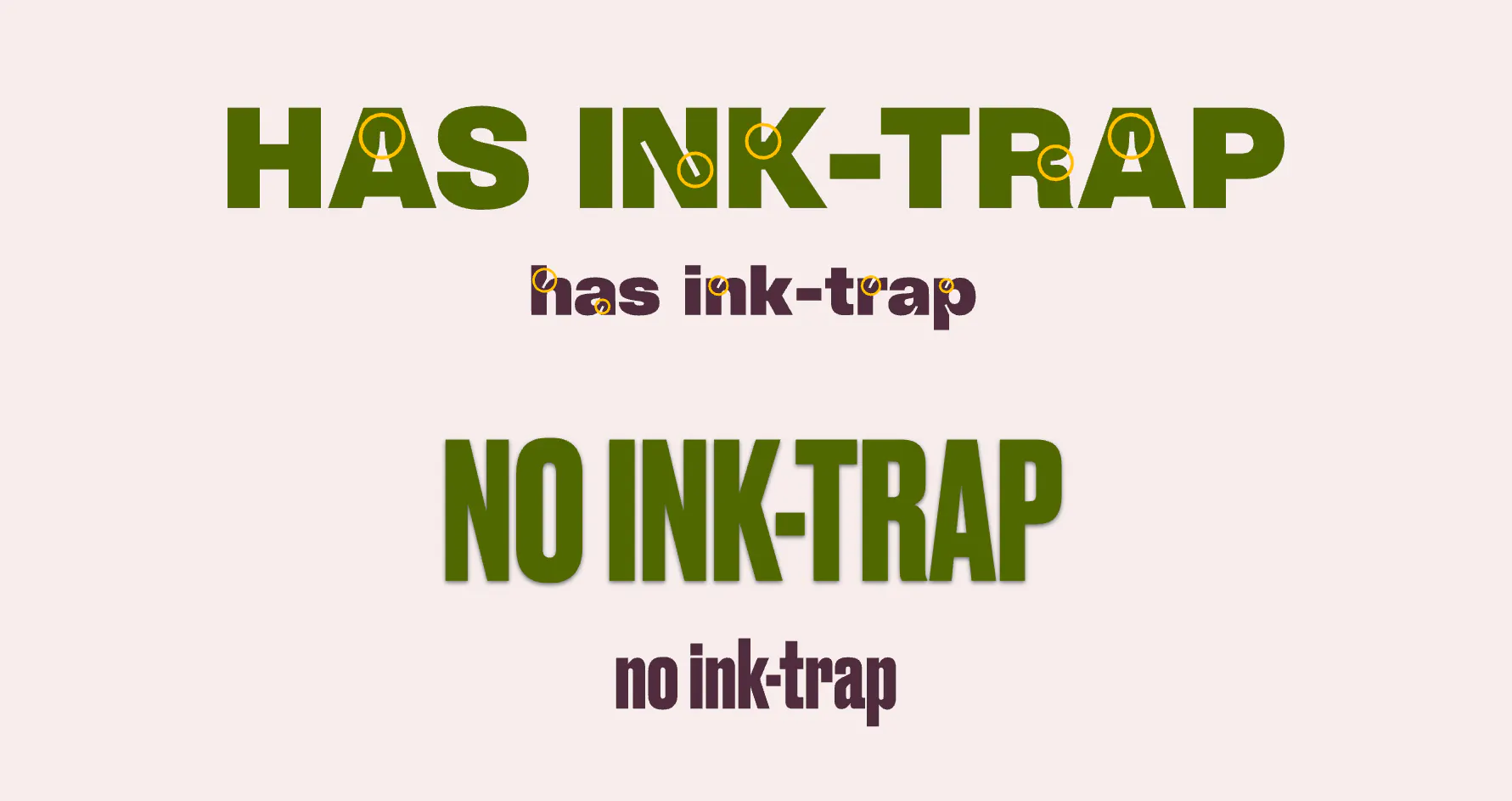
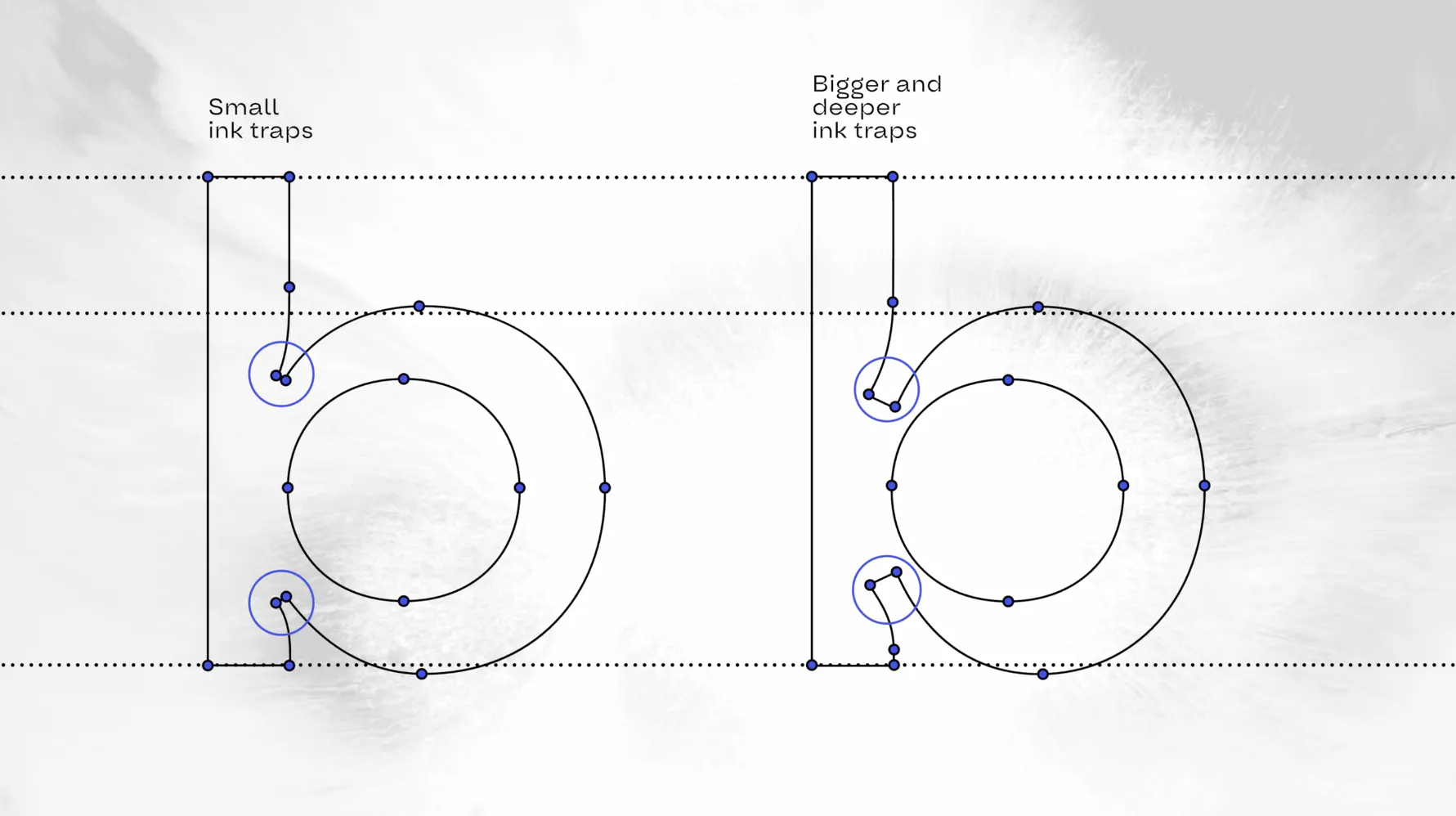
Ink traps come in different sizes depending on the intended use of the typeface.
- Small ink traps are subtle they preserve legibility without dramatically altering the aesthetic of the typeface.
- Bigger and deeper ink traps are more exaggerated. These exaggerated forms add a bold and edgy visual touch to modern designs.
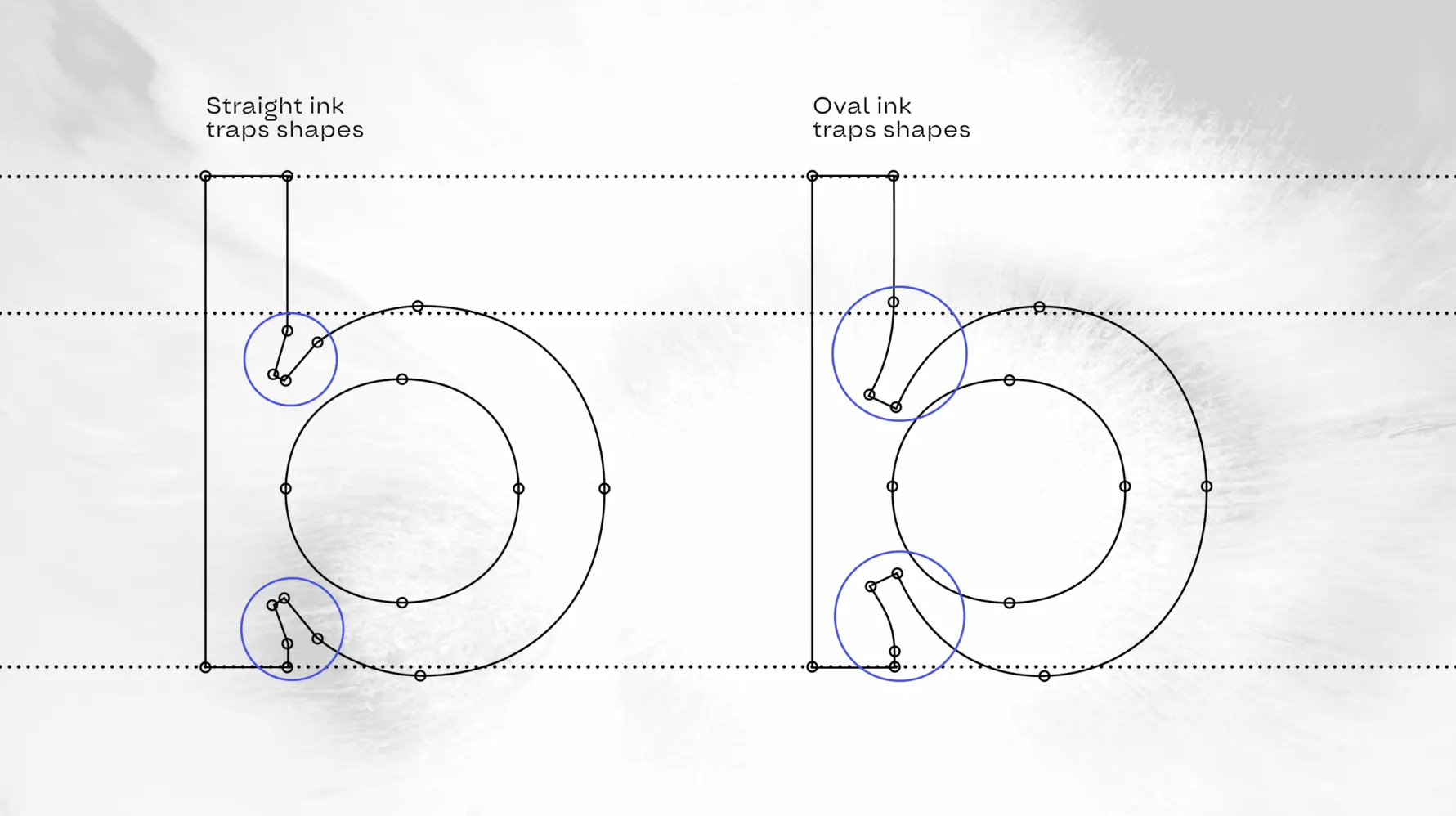
The shape of an ink trap can also vary depending on the style you want:
- Straight ink traps feature angular cuts. They create a sharp, somewhat mechanical feel. They often give a more industrial or utilitarian aesthetic, making them great for tech-forward or brutalist designs.
- Oval ink traps are more fluid and organic, offering a softer, more playful tone. Their rounded forms blend more naturally with the letters curves.
Why were ink-trap fonts invented?
Ink-trap fonts were originally designed for physical printing with ink to prevent ink bleed. The notches would “trap” the ink to help prevent ink spread or bleeding. This kept the letters sharp and legible.
This was when the ink would bleed during printing and was a common problem for small prints. The corners were too condensed, causing blurred edges and affecting readability.
Why do we love ink-trap fonts?
So they were invented for practical purposes, yet today we appreciate them for their bold aesthetic. They add a unique extra spice to otherwise standard text.
Plus, they’re extremely versatile and are being used in everything from professional branding and websites to packaging and poster design. And while originally designed for body text and post-script usage, they’ve become especially popular as striking display fonts.
In the video below, Graham shows you how to create ink-trap font posters. Watch for the step-by-step tutorial, design tips for using ink-trap fonts, and inspiration for your own poster designs.
Ink trap font examples
You can tell ink-trap fonts apart from standard by the notches at the corners.
Here are just 12 popular ink trap fonts to check out — but you can find even more in Kittl.
- Agdasima
- Aldrich
- Aloke Gron
- Ambidexter
- Bricolage Grotesque
- Climate Crisis
- Daft Sans VF
- DT Getai Grotesk
- Edgeway Pro
- Growth Tracks
- Vodigl
- Naira
Access the project below that contains all the fonts listed and browse through the rest. To find more ink-trap fonts, just search “ink trap” in the font panel to pull up options easily.

Design tips: How to design with ink-trap fonts
Ink-trap fonts work best in display sizes for titles and headers — anywhere your text needs to be a focal point. Here are some tips to use them effectively:
1. Go big
Maximize the strong visual impact of these fonts by using them as headers in extra-large text. A larger size helps to emphasize the notches and angles, making them a key part of the entire composition.
2. Layer for depth and extra visual interest
One of the benefits of bold ink-trap fonts being highly legible means they work great with text effects. Try adding an outline or drop shadow to make it pop. You can do this easily with Kittl’s text effects add a drop shadow, line shadow, block shadow, or even 3D shadow with just a click.
3. Balance it out
Now this tip pertains to your entire composition pair your ink-trap font with a simpler body text font. This helps keep your design polished and balanced. Plus it helps create a visual hierarchy.
4. Get creative with where you use ink-trap fonts
Don’t assume the use case for ink-trap fonts is limited. They’re clean, modern, and extremely versatile. Use them in everything from posters, social graphics, product packaging, or branding, anywhere you want unique header text that pops.
Where to download ink-trap fonts
You can access a collection of ink-trap fonts in Kittl with a free account. Search ink trap in the font search bar and explore all the available options in the design editor. Font styles vary, so you’re covered no matter the context you’re designing for.
Plus, they’re free to use with a free account.