
The world of graphic design is always evolving, which means the skills that demand designers’ attention are always changing. With new technologies, shifting trends, and growing content demands, staying ahead of the curve is essential for designers who want to thrive.
Whether you’re aiming to land a new role, impress clients, or expand your freelance offerings, you’ll find success in sharpening your skill set.
So, what should you focus on?
From leveraging AI tools as a creative companion to diving deeper into branding and sustainable design, we’ve rounded up the top 10 skills for designers to master in 2025 (if you haven’t already). These are practical, in-demand skills that will make you more versatile, marketable, and ready to take on new challenges.
Many of these skills overlap, so mastering one naturally helps you develop another. We’ll look at each separately, suggest next steps you can take, and provide a few online courses to get you started (most of them are free).
Jump in to discover which skills to tackle next to enhance your resume and stand out in the competitive design world.
1. Artificial intelligence (AI) integration
AI has been at the forefront of a momentous shift in how we work. From learning how to write better AI prompts for image generation to automating repetitive tasks, these tools make designer workflows faster and easier.
So, mastering how to leverage it and showcasing this on your professional resume becomes one of the most sought-after graphic designer skills. It positions you as a forward-thinking candidate.
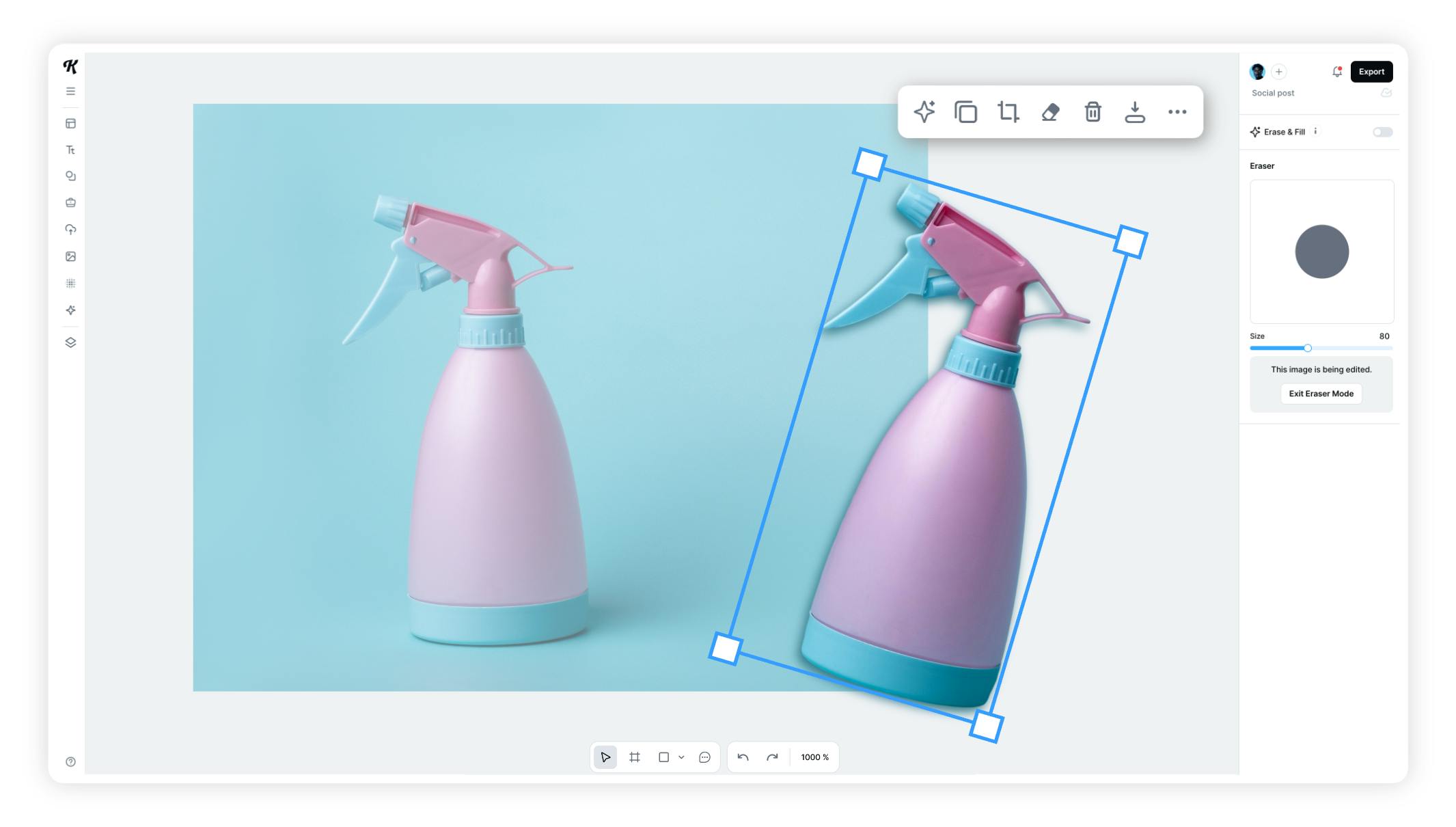
Let’s explore how an AI tool can streamline your workflow using two scenarios where you need to create a large collection of Instagram posts for a product.
In the first scenario, you manually remove the background of multiple photos with a tool such as Photoshop’s Pen Tool. While this classic method offers precision, it’s time-consuming, leaving less time for the actual design.
In the second scenario, you use AI to remove the background with a single click. You can also refine it as needed with an erase and fill tool. This task is done in seconds, allowing you to focus more on the design and move on to the next project.
Both options achieve similar results, but the AI tool saves significant time. While removing backgrounds manually offers precise control for detailed work, social media posts are often consumed quickly.
So the main goal is to capture attention and drive action with a CTA.
The key takeaway here? Learn when to prioritize high precision and when to leverage AI to automate repetitive tasks, saving time for what matters most.
The more comfortable you are with these tools, the more versatile you’ll become as a designer.
2. UI/UX design
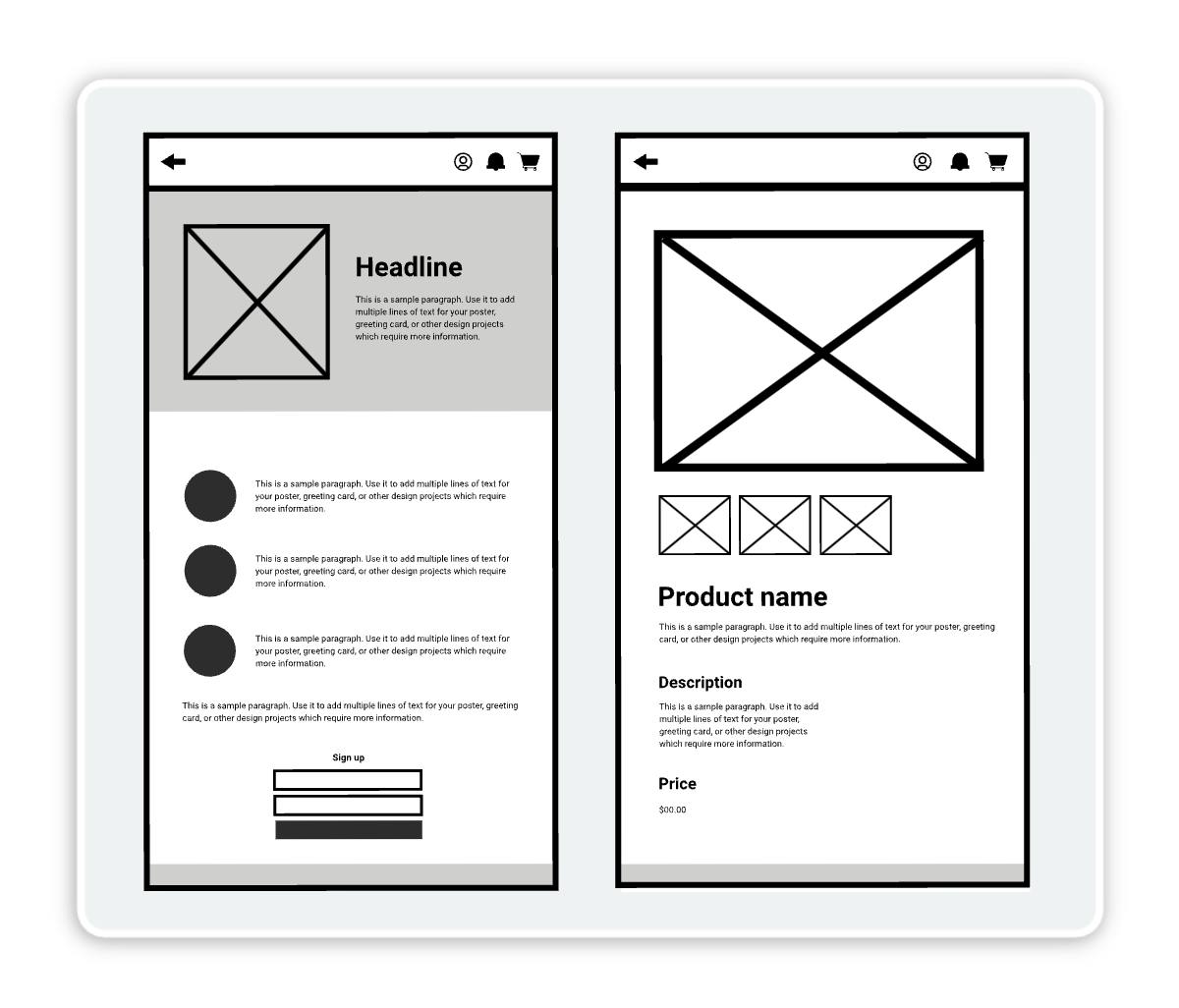
Strong UI/UX design revolves around understanding how users interact with visuals. Whether it’s a website, app, or landing page, designing for usability and engagement is an essential skill – and if you haven’t mastered it yet, it’s time.
The trick to learning these particular graphic designer skills is to anticipate user behavior insights. For example, what makes someone click a button or stay on a page longer? Even something like designing a simple infographic can be more effective when you know how to guide the viewer’s eye.
Mastering these details will help you design smarter and create digital experiences that deliver real results for businesses.
How to get started:
We sat down with master UX specialist, Ioana Teleanu, to talk about the differences between UX, UI, web, and product design (with some bonus tips on how to leverage AI the smart way when it comes to developing everything from simple websites to fully functioning apps).
If you’re looking to branch your graphic design career in this direction, watch the interview below for some quick tips and expert insights.
For more long-form learnings on UI and UX design, check out the resource below:
- Google UX Design Professional Certificate – Google
- Microsoft UX Design Professional Certificate – Microsoft
3. Coding for designers
Not necessarily common graphic designer skills, understanding code, such as HTML, CSS, and JavaScript, can be a significant leg up for designers looking to expand into web and app development.
While no-code tools have simplified web and app development, foundational knowledge of coding highlights you as a highly skilled and versatile design professional.
It can give your resume the extra shine needed to stand out in today’s competitive job market.
It can make your job easier as well. For example, a design that looks amazing as a static mockup may face limitations in real-world environments.
But the designers who understand coding fundamentals can communicate better with developers to create designs that translate seamlessly into functional websites.
Check out these courses to build your coding foundation in HTML, CSS, and JavaScript:
- HTML for Designers – Uxcel
- CS50: Introduction to Computer Science – Harvard University on edX
- CS50s Web Programming with Python and JavaScript – Harvard University on edX (this course picks up where CS50: Introduction to Computer Science leaves off)
4. Web and mobile apps
One of the most promising areas for designers to invest time in is web and mobile app design.
In fact, a 2023 study by UX Tools revealed that web apps were the top area where designers worked, with mobile apps close behind in third place.
For designers who haven’t tapped into these fields yet, they’re a great area to focus on to expand your portfolio and become a more sought-after professional.
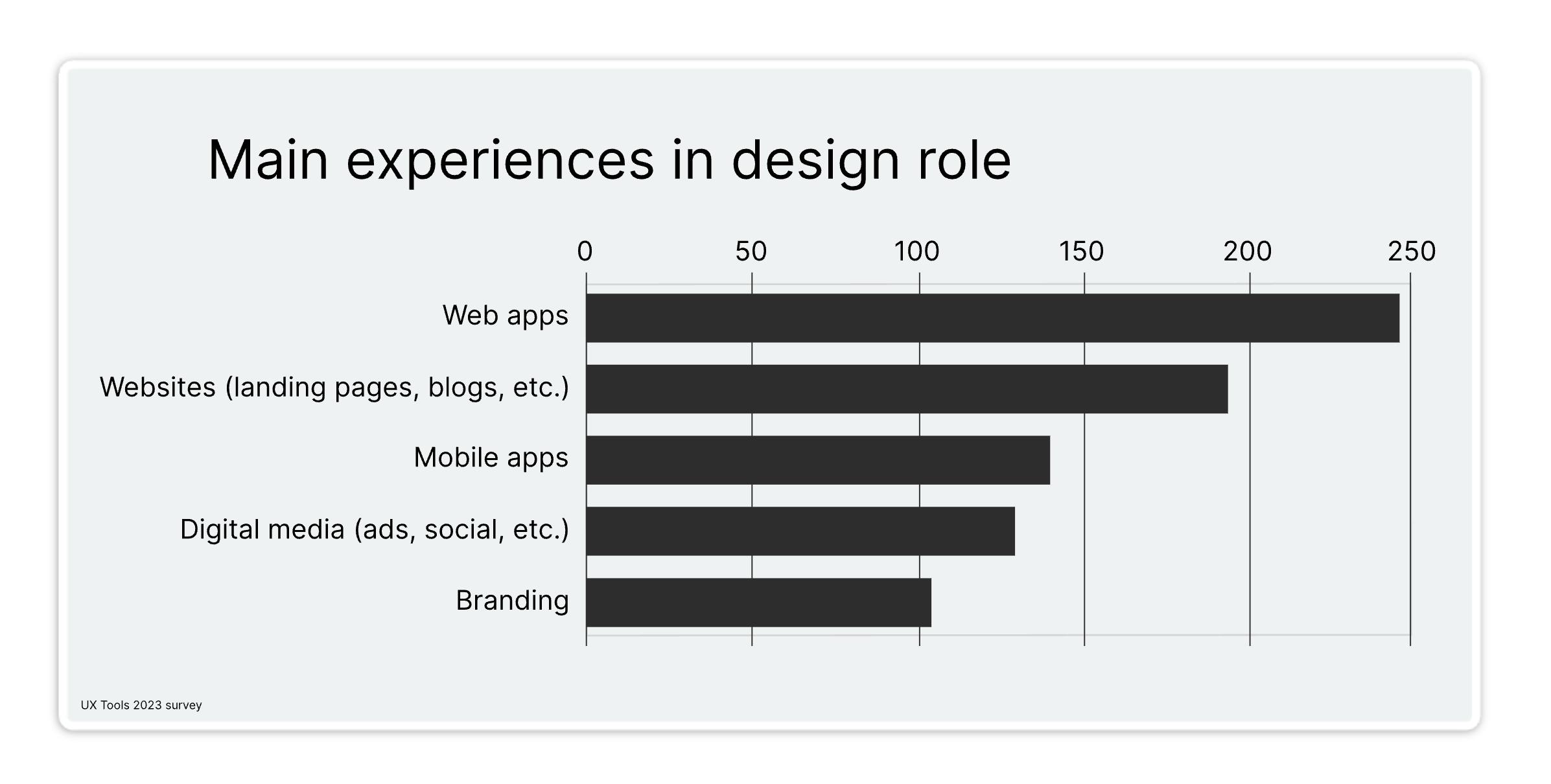
The graphic designer skills and requirements of web and mobile app designers overlap in many ways but they also have distinct characteristics that make learning both worthwhile. But, mastering the core skills in one will give you a significant advantage in the other.
Here’s a quick breakdown of the core areas where these two design disciplines overlap. These areas are a great starting point to learn both web app design and mobile app design:
- UI design: Whether designing for web or mobile, understanding visual hierarchy, effective layout creation, and typography are essential. Great UI design also relies on a firm grasp of color theory to enhance the overall aesthetic and user experience. You’ll also want to become familiar with tools for creating wireframes, prototypes, and design mockups that are responsive across devices.
- UX design: UX design revolves around creating seamless, intuitive user flows that make navigation easy and enjoyable.
- Prototyping and interaction design: Creating interactive prototypes to showcase functionality.
- Collaboration and communication: Working closely with developers, product managers, and stakeholders.
- Adaptability: Keeping up-to-date with the latest design trends, tools, and best practices. Adapting designs for both light and dark modes.
By investing in these skills, you can expand your opportunities, take on more diverse projects, and even pivot to new career paths such as UX design, product design, or interaction design.
How to get started
If you’re new to web or mobile app design, there are a lot of resources to start with to gain a foundational knowledge. Here are a few to get started that you can combine with the courses listed in section 2 (UI/UX) and section 3 (coding for designers) of this article:
- Mobile App Design in Sketch 3: UX and UI Design From Scratch – Udemy
- Introduction to APIs – Coursera
5. Branding and identity design
Branding is more than just logos and colors — it’s about telling a story that connects with people. Whether you’re following established brand guidelines or building something from scratch, having a strong understanding of branding and identity design is essential.
Dive deep into the why behind branding: Why is it important? What makes a brand memorable? Learn how to create cohesive visual identities that align with a company’s voice and values.
This is one of the graphic designer skills that not only makes you more valuable to employers or clients but also equips you to take on complex projects like company rebrands.
How to get started
Learn the basics of branding and identity design with free resources such as our quick guide exploring how to choose brand colors. This guide includes a design challenge at the end to help you dive into practical application of designing a brand image.
We sat down with brand agency owner, Rob How, Founder & CEO of How&How, to discuss the world of a branding designer. Watch the video below — this is an excellent, quick way to introduce you to the world of brand and identity design with guidance from a highly experienced professional.
Stay tuned in at the end where Rob provides expert insights into pricing services as a brand designer.
Plus, if you’re interested in building your brand as a freelancer or business owner, you can learn the 20 essential tips from our personal brand-building guide.
If you’re hungry for more brand design knowledge after this, you can find tons of long-form courses on learning platforms like Coursera. Here’s a few to build a strong foundation:
6. Typography expertise
Here is another one of the graphic designer skills you can easily dip your feet into. You likely already have a strong grasp of typography principles, including composition, hierarchy, color contrast, and text readability.
In 2025, leveling up your typography skills means more than selecting the right fonts — you can create them.
Custom typeface design is a powerful skill that can elevate your work and set you apart in the competitive design industry. Mastering the art of designing unique letterforms can bring an entirely new level to your projects.
Whether you’re crafting a bespoke brand identity, editorial layout, or digital product, custom typography adds originality and character that pre-made fonts simply can’t replicate.
How to get started
To dive even deeper into how to apply this skill, check out Introduction to Typography, a course on Coursera hosted by California Institute of the Arts.
For even more, you can find a wide range of online typography design courses on Domestika. These courses cover everything from typography design for logos to experimental design techniques that break the rules and stand out.
Check out our popular typography masterclass below on the history, development, and evolution of typography.
7. Ads and social media
The demand for fresh, eye-catching content continues in 2025. And the demands are asking for more graphic designer skills in creating faster content.
In 2025, graphic designers who know how to create visuals that perform well across platforms, from LinkedIn to Instagram to YouTube, will give you a competitive edge.
Here are some insights from Kittl’s Social Media Marketing Manager, Duda Monteiro:
Here are some key areas to focus on:
- Stay tuned into graphic design trends and consumer interests. Plus, know the optimal formats and platform-specific requirements (aspect ratios, file sizes, and visual styles) for each platform.
- Learn how to analyze the performance metrics (such as CTR, engagement rates, and viewer retention) of your visual content. Don’t stop there – use this information to iterate on designs and improve engagement.
- Learn how to personalize visuals to appeal to specific target audiences. Ads specifically need to be tailored for different demographics, preferences, and regions.
- A valuable bonus skill is video content, which continues to dominate social media. As a graphic designer, having skills in motion graphics, animations, and short-form video editing will set you apart. This can apply not only to traditional ads but also to short-form video storytelling, which is increasingly in demand.
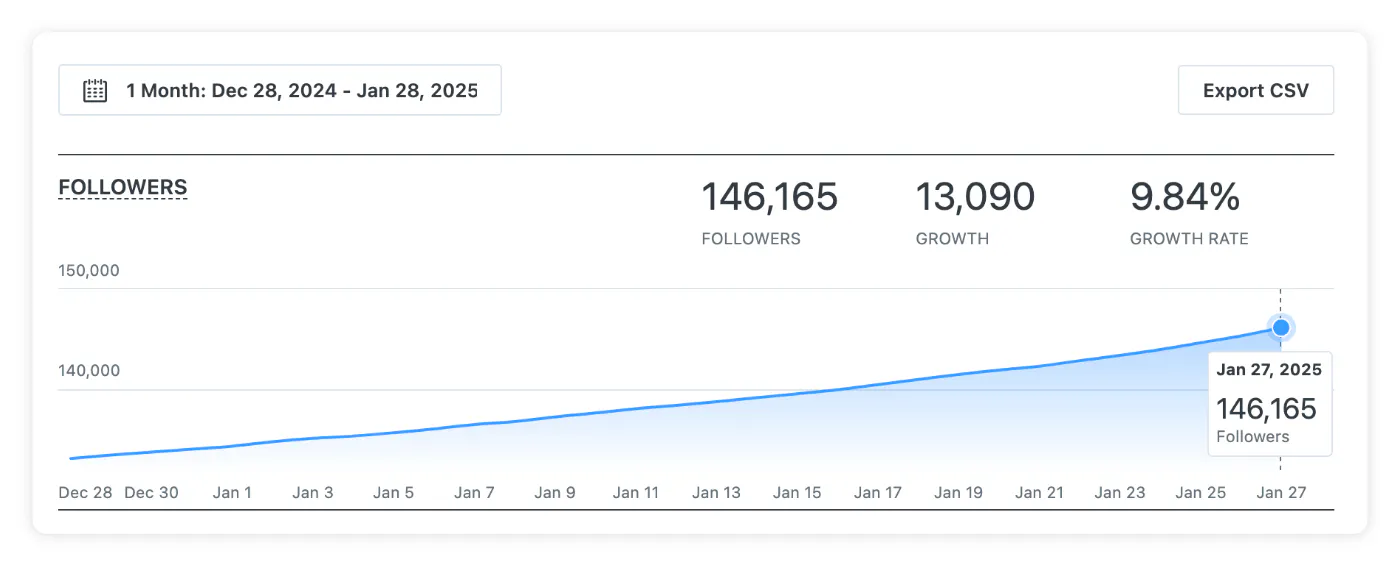
To study this in action, let’s take a quick look at Kittl’s Instagram performance.
Through consistent performance analysis, trend tracking, and deep dives into the interests of our audience, Social Media Marketing Manager, Duda Monteiro, creates the type of content that viewers want to see.
Through this, she’s achieved tremendous (and consistent) growth in followers of nearly 10% in a single month.
How to get started
You can find affordable and free resources on platforms such as HubSpot in addition to the usual education platforms like Coursera and Udemy. Here’s where to start:
- Social Media Marketing Certification Course – HubSpot
- Measure and Optimize Social Media Marketing Campaigns – Meta
8. Packaging design
If you look at current job listings for graphic designers, you’ll find many of them are for package designer specialists. These roles seek designers who can create trend-forward packaging solutions that evolve with brands.
This goes beyond good design. These particular graphic designer skills require expertise in packaging quality, industry/trend awareness, and efficient cross-collaboration skills, as you’ll most likely be collaborating with product departments, vendors, buyers, and more.
From bold, innovative designs to simple and minimalist, we’re currently seeing multiple packaging trends. Current popular packaging designs stand out with unique, aesthetically pleasing designs but staying sustainable as well.
Consumers increasingly seek brands that prioritize eco-friendly materials alongside visually appealing designs. Because of this, packaging design requires a blend of creativity and functionality.
Think about how you can elevate the unboxing experience or create something that customers will want to keep.
How to get started
Browse a selection of packaging design courses on Domestika – these courses cover essential packaging design skills such as durability, brand alignment, typography, illustration, and more.
We discuss rugged/sustainable packaging as a growing trend for 2025 in the video below. Give it a watch to learn more about this packaging style.
9. Marketing and strategy
One of the most common graphic designer skills that frequently comes up in current graphic design job listings lies in marketing. Companies are looking for graphic designers with knowledge of marketing principles and best practices for a more data-driven approach.
So for 2025, designers who can think like marketers – analyzing funnels, predicting consumer behavior, and optimizing for conversions – will have a huge advantage. It will not only make you a more attractive candidate, it can make your work much more effective.
This is about enhancing your creative power. When you understand how design impacts business goals, you can create visuals that drive results.
On top of that, with foundational knowledge of marketing terms and principles, you can collaborate more effectively with marketing teams.
How to get started:
There are tons of free, long-form courses available on platforms like HubSpot and SEMrush, in addition to Coursera and Udemy. We recommend taking the foundational courses on these platforms first and expanding on specific areas of interest from there. Here’s a few short courses to get you started:
- Attract and Engage Customers with Digital Marketing – Google
- Content Analysis Training – HubSpot
- Understanding Behavioral Marketing and Customer Segmentation – HubSpot
10. Team and client collaboration
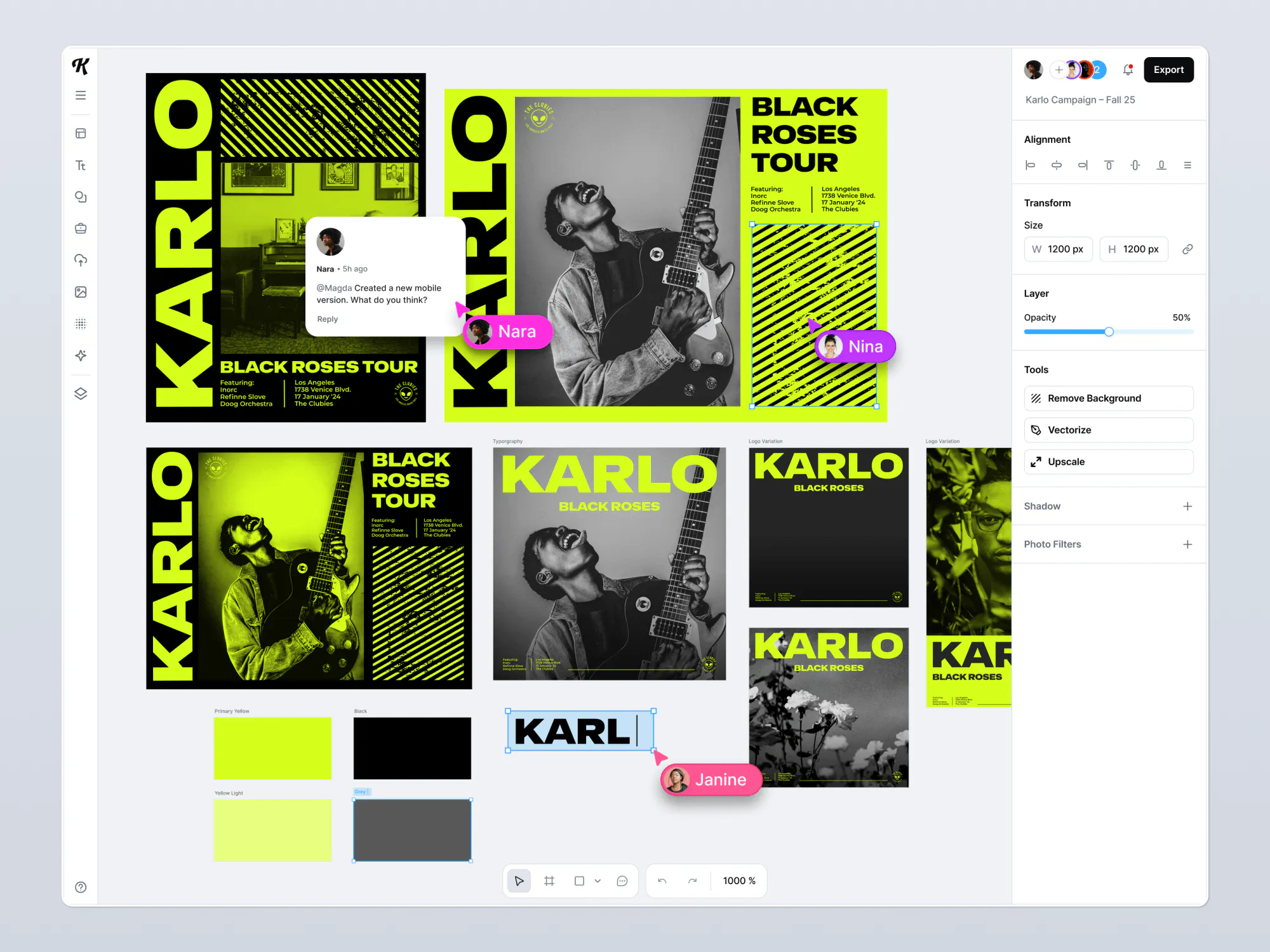
Collaboration is one of the graphic designer skills that can be messy. But in 2025, there’s no reason it has to be. Designers often get stuck managing feedback across emails, Slack, and other tools, leading to confusion and wasted time.
The solution? Real-time collaboration tools that let you work directly in your design platform. With in-project commenting, live editing, and centralized project management software, you can reduce back-and-forth emails and misplaced feedback.
Mastering the collaboration process this way will position you as an efficient designer that clients will rave about.
Learn more about Kittl’s real-time collaboration design feature, add this process to your workflow, and start growing your credibility with clients and team members today.